Falcon BMS TMS/DMS/CMS Guide — WIP File Naming Convention
Work-in-Progress File Organization and Nomenclature
Status: Official Rule Set
Effective Date: 06 March 2026
Applies to: All isolated chapter, section, table, note, and visual files under development
Relationship to VERSION-SYSTEM: Complementary; does NOT affect main document versioning
Relationship to BRIEFING: Operational rules for files described structurally in BRIEFING Section 11
0. Introduction and Scope
0.1 Purpose
During the development of the TMS/DMS/CMS Guide, content is created and revised in isolated files before integration into the main document (guide.tex). This specification establishes a clear, unambiguous naming convention for all work-in-progress (WIP) files to enable:
- Quick identification of file type, target location, and development stage
- Automatic sorting by chapter, section, and creation date
- Audit trail of structure and progress
- Efficient workflow without version-control overhead
- Predictable automation of file status transitions and organization
0.2 Key Principles
WIP files do NOT affect the version number of the main document (guide.tex).
Only content integrated into the main file triggers a version bump. WIP filenames are organizational tools, not version markers.
All WIP files MUST be created from the canonical template:
template/template-wip.tex
This ensures preamble consistency, metadata structure, and integration hygiene. The template is versioned independently and governed by BRIEFING Section 11. Never modify the template directly; always copy, rename following Section 2 patterns, and then edit the copy.
Author controls integration. The author is responsible for integrating WIP content into the guide snapshot. AI assists with research for content creation and review, but does not perform the actual integration.
0.3 Scope
This convention applies to:
- Isolated chapter files (
chapter-*.tex) — including consolidated chapters - Isolated section files (
section-*.tex) - Table files under development (
table-*.tex) - Research notes and snippets (
notes-*.md) - Visual assets (diagrams, flowcharts, schematics) (
visual-*.*)
This convention does NOT apply to:
- The main guide file (
guide.tex) — covered by VERSION-SYSTEM - Guide snapshots (
wip/guide/guide-v*.tex) — covered by VERSION-SYSTEM - Compiled PDFs or other binary outputs
- Git commit messages or version control metadata
- External reference materials or archived publications
- The canonical template file (
template/template-wip.tex) — this is the structural foundation that WIP files derive from, not a WIP file itself
Note on metadata blocks: Guide snapshots and guide.tex share the same preamble as WIP files but do not carry a WIP metadata block. This is by design — they are versioned documents, not work-in-progress files. Their tracking information is embedded in the preamble macros (\docversion, \docbuild) and the filename itself.
Note on alpha snapshots: Files following the pattern
wip/guide-vMAJOR.MINOR.PATCH.SUBPATCH-alpha.N[.M]-YYYYMMDD.tex are alpha
pre-release snapshots. They reside in wip/ root (not wip/guide/) and their
naming rule is defined in VERSION-SYSTEM (§2.1). They are not WIP content
files under this convention, but they coexist in wip/ with WIP files when
pre-release infrastructure is active.
0.4 File Organization Structure
All WIP files are organized in a dedicated project structure:
project-root/
├── guide.tex                        (CANONICAL — subject to VERSION-SYSTEM)
│
├── docs/                            (Project governance documents)
│   ├── project-tracking.md
│   ├── version-system.md
│   ├── wip-naming.md                (This document)
│   └── briefing.md
│
├── template/                        (Canonical templates)
│   └── template-wip.tex             (Mandatory starting point for all WIP files)
│
├── misc/                            (Style guide and supplementary materials)
│   └── STYLE-GUIDE.md               (Writing style rules — mandatory reference)
│
├── wip/                             (Active work-in-progress)
│   ├── chapter-*.tex                (Chapter WIP files)
│   ├── section-*.tex                (Section WIP files)
│   ├── table-*.tex                  (Table WIP files)
│   ├── notes-*.md                   (Research notes)
│   ├── visual-*.*                   (Visual assets)
│   ├── guide-v*-alpha.*-*.tex       (Alpha snapshots — only when pre-release active)
│   │
│   └── guide/                       (Guide snapshots — VERSION-SYSTEM)
│       └── guide-v*.tex             (Current active snapshot)
│
└── archive/                         (Completed, deprecated, or historical)
    ├── GUIDE/                       (Previous guide snapshots)
    │   └── guide-v*.tex
    │
    └── WIP/                         (Integrated or deprecated WIP files)
        ├── section-*-approved-*.tex
        └── chapter-*-deprecated-*.tex
Key points:
- Lowercase for first-level folders (
wip/,archive/,docs/,template/) - Uppercase for archive subfolders (
GUIDE/,WIP/) - Only one active snapshot in
wip/guide/at a time - All previous snapshots archived in
archive/GUIDE/
0.5 How to Create a New WIP File (Step-by-Step)
All WIP files MUST start from the canonical template. Follow this workflow:
→ Visual reference: WIP File Creation Workflow

Step 1: Copy the Template
Copy the template file from the templates folder to the wip folder:
Copy: template/template-wip.tex
To:   wip/[temporary-name].tex
The template is a complete, compilable LaTeX document. This ensures all WIP files inherit:
- Standardized preamble (geometry, packages, macros)
- Metadata block structure (for tracking)
- Pre-configured
hotastableenvironment (ready for tables)
Step 2: Rename Following Section 2 Patterns
After copying, immediately rename the file using the exact naming pattern for your WIP type:
| Type | Pattern | Example |
|---|---|---|
| Chapter | chapter-C{N}-{TITLE}-{STATUS}-{DATE}.tex |
chapter-C3-tms-dev-2026-01-09.tex |
| Section | section-C{N}-S{M}-{TITLE}-{STATUS}-{DATE}.tex |
section-C5-S2-cms-actuation-dev-2026-01-09.tex |
| Table | table-C{N}-{CONTEXT}-{SWITCH}-{STATUS}-{DATE}.tex |
table-C3-AA-TMS-dev-2026-01-09.tex |
| Notes | notes-C{N}-{TOPIC}-{TYPE}-{DATE}.md |
notes-C5-cms-structure-outline-2026-01-09.md |
| Visual | visual-C{N}-{DESC}-{TYPE}-{STATUS}-{DATE}.{ext} |
visual-C6-tms-hat-diagram-dev-2026-01-09.svg |
Always start with status dev (never reviewed by author).
Step 3: Fill Content and Update Status as You Progress
-
Edit the metadata block to document target chapter, section, and status.
-
Fill the content: Write narrative, populate tables, add visuals.
-
Update status in filename as you progress:
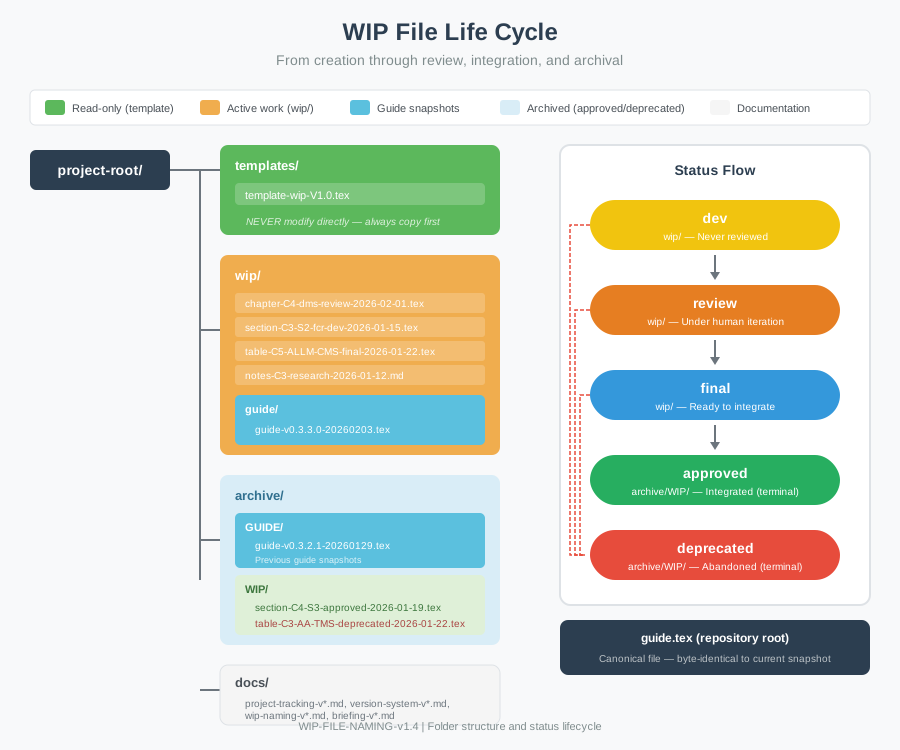
STANDARD FLOW (always applicable):
dev→ when first created from templatereview→ when author begins iterationfinal→ when author decides “this is solid, ready to integrate”approved→ after author integrates into guide.tex (move toarchive/WIP/)
ALPHA FLOW (parallel, optional — active only when pre-release infrastructure is in progress):
alpha→ author approves content for pre-release; WIP is integrated into the alpha snapshot and renamed toalphastatus; file remains inwip/approved→ when the alpha snapshot is promoted to the official guide release; all alpha WIP files are archived asapprovedat that point (move toarchive/WIP/)
The standard flow remains intact and unaffected by the alpha flow. Use
alphaonly when explicitly working with pre-release infrastructure.
Critical rule: NEVER modify the template file itself. Always copy first, then rename and edit the copy.
1. Global Naming Rules
1.1 Character Set
- Allowed:
a-z,A-Z,0-9, hyphens (-) - Prohibited: spaces, dots (except extension), special characters (
@,#,$,_in body) - Case:
- Use lowercase for the free-text parts (
{title},{desc},{topic}, etc.). - Uppercase is allowed only for structured tokens and established codes (e.g.,C{N},S{M},AA,AG,NAV,GEN,TMS,DMS,CMS,CMDS,HOTAS). - Encoding: UTF-8
1.2 Separators
- Hyphens (
-): Primary separator for all components - Dots (
.): Reserved for file extension only
✅ section-C3-S2-fcr-crm-modes-review-2026-01-18.tex
❌ section_C3.S2_fcr_crm_modes_review_20260118.tex
1.3 Date Format
All dates use ISO 8601 extended format: YYYY-MM-DD
✅ 2026-01-18
❌ 20260118, 01/18/2026, 18 Jan 2026
1.4 Filename Length
- Maximum: 100 characters (recommended for readability)
- If exceeding, abbreviate the title or split into multiple files
2. File Categories and Naming Patterns
2.1 Chapter Files
Purpose: Complete chapters under development, including consolidated chapters that combine multiple sections.
Pattern:
chapter-C{N}-{TITLE}-{STATUS}-{DATE}.tex
Examples:
chapter-C1-introduction-dev-2026-01-05.tex
chapter-C4-dms-final-2026-02-01.tex
chapter-C5-cms-countermeasures-approved-2026-01-21.tex
Consolidated Chapter Pattern:
When developing a chapter, you may either:
- Work section-by-section: Create individual
section-C{N}-S{M}-*.texfiles, then integrate each into the guide - Work as consolidated chapter: Create a single
chapter-C{N}-*.texfile containing all sections
The consolidated approach is preferred when:
- Multiple sections are ready for review together
- Sections have strong interdependencies
- You want to review chapter flow as a whole
Example workflow (C4 DMS):
# Individual sections developed first:
section-C4-S1-concept-soi-final-2026-01-14.tex
section-C4-S2-dms-up-final-2026-01-14.tex
section-C4-S3-dms-down-final-2026-01-18.tex
section-C4-S4-dms-left-right-final-2026-01-21.tex

# Then consolidated for final review:
chapter-C4-dms-review-2026-01-30.tex  (contains all sections)
chapter-C4-dms-final-2026-02-01.tex   (ready for integration)
2.2 Section Files
Purpose: Individual sections developed in isolation, to be merged into a chapter or guide.
Pattern:
section-C{N}-S{M}-{TITLE}-{STATUS}-{DATE}.tex
section-C{N}-S{M}-S{K}-{TITLE}-{STATUS}-{DATE}.tex  (subsection)
Examples:
section-C3-S1-concept-general-behaviour-dev-2026-01-15.tex
section-C3-S2-fcr-crm-modes-review-2026-01-18.tex
section-C4-S2-S1-mfds-format-selection-final-2026-01-19.tex
Hierarchy preference: Keep filenames shallow (max 2 levels: C{N}-S{M}-S{K}). Use document structure inside the file for deeper nesting.
2.3 Table Files
Purpose: HOTAS tables (TMS, DMS, CMS) developed in isolation.
Pattern:
table-C{N}-{CONTEXT}-{SWITCH}-{STATUS}-{DATE}.tex
Context codes: AA (Air-to-Air), AG (Air-to-Ground), DGFT (Dogfight), NAV (Navigation), MFDS (MFD/SOI), ALLM (All Modes)
Examples:
table-C3-AA-TMS-dev-2026-01-15.tex
table-C4-MFDS-DMS-review-2026-01-20.tex
table-C5-ALLM-CMS-final-2026-01-22.tex
2.4 Notes Files
Purpose: Research notes, outlines, reference compilations. Never published; support materials only.
Pattern:
notes-C{N}-{TOPIC}-{TYPE}-{DATE}.md
Types: research, snippet, outline, questions, reference, example
Examples:
notes-C3-fcr-radar-modes-research-2026-01-12.md
notes-C5-cms-structure-outline-2026-01-15.md
notes-GEN-missing-content-questions-2026-01-16.md
Note: Notes do NOT have status codes — they’re either in wip/ (active) or archive/WIP/ (historical).
2.5 Visual Files
Purpose: Diagrams, flowcharts, schematics, reference cards.
Pattern:
visual-C{N}-{DESCRIPTION}-{TYPE}-{STATUS}-{DATE}.{ext}
Types: diagram, flowchart, schematic, reference, illustration
Extensions: .svg (preferred), .pdf, .png, .tex (TikZ only)
Examples:
visual-C6-tms-hat-layout-diagram-dev-2026-01-28.svg
visual-C3-radar-mode-flowchart-final-2026-01-20.tex
visual-C6-quick-reference-card-review-2026-01-25.pdf
2.6 Title Slugification Rules
When creating filenames, convert descriptive titles to slugs:
| Rule | Example |
|---|---|
| Use established acronyms | “Frequency-Cued Radar” → fcr |
| Keep 2-4 key concepts | “FCR and CRM operational integration” → fcr-crm-integration |
| Max ~30 characters for title | Abbreviate or split if longer |
| Lowercase, hyphens only | fcr-crm-modes ✅, FCR_CRM_Modes ❌ |
Established acronyms: FCR, CRM, SAM, DMS, TMS, CMS, SOI, MFD, HUD, RWR, CMDS, ECM
3. Status Codes and Lifecycle
3.1 Status Definitions
| Status | Location | Meaning | Next Status |
|---|---|---|---|
dev |
wip/ |
Never reviewed by author | review or deprecated |
review |
wip/ |
Under author iteration | final or deprecated |
final |
wip/ |
Approved, ready to integrate | approved or deprecated |
alpha |
wip/ |
Parallel flow only: author approved for pre-release; content integrated into alpha snapshot | approved or deprecated |
approved |
archive/WIP/ |
Integrated into guide | (terminal) |
deprecated |
archive/WIP/ |
Abandoned | (terminal) |
3.2 Lifecycle Diagram
═══════════════════════════════════════════════════
STANDARD FLOW
═══════════════════════════════════════════════════

                    ┌─────────┐
                    │   dev   │
                    │ (wip/)  │
                    └────┬────┘
                         │
              ┌──────────┼──────────┐
              │                     │
       (author review)          (abandon)
              │                     │
         ┌────▼────┐          ┌─────▼──────┐
         │ review  │          │ deprecated │
         │ (wip/)  │          │(archive/WIP)│
         └────┬────┘          └────────────┘
              │
    ┌─────────┼─────────┐
    │                   │
(author approves)   (discard)
    │                   │
┌───▼───┐         ┌─────▼──────┐
│ final │         │ deprecated │
│(wip/) │         │(archive/WIP)│
└───┬───┘         └────────────┘
    │
    ├───────────────┐
    │               │
(integrate)    (change mind)
    │               │
┌───▼─────┐   ┌─────▼──────┐
│approved │   │ deprecated │
│(archive/│   │(archive/WIP)│
│  WIP/)  │   └────────────┘
└─────────┘

═══════════════════════════════════════════════════
ALPHA FLOW  (parallel, optional)
═══════════════════════════════════════════════════

    ┌───────┐
    │ final │  ← same "final" node as Standard Flow above
    └───┬───┘
        │
        │  (author integrates into alpha snapshot)
        │
    ┌───▼───┐
    │ alpha │
    │(wip/) │
    └───┬───┘
        │
   ┌────┴────────────────┐
   │                     │
(alpha promoted         (abandon)
 to official guide)         │
   │                  ┌───▼────────┐
┌──▼──────┐           │ deprecated │
│approved │           │(archive/WIP)│
│(archive/│           └────────────┘
│  WIP/)  │
└─────────┘
→ Visual reference: WIP File Life Cycle
3.3 Transition Rules
3.3.1 Standard Flow
Allowed:
dev → review(author begins work)dev → deprecated(abandon before review)review → review(continue iteration — update date)review → final(author approves)review → deprecated(discard during iteration)final → approved(after integration)final → deprecated(change mind before integration)
Forbidden:
review → dev(cannot un-review)final → review(cannot un-approve)approved → any(terminal, immutable)deprecated → any(terminal, immutable)
3.3.2 Alpha Flow
Allowed:
final → alpha(author integrates content into alpha snapshot)alpha → approved(alpha snapshot promoted to official guide; all alpha WIP files archived in batch)alpha → deprecated(abandoned before official integration; GitHub pre-release tag stays as historical record)
Forbidden:
alpha → final(cannot revert approval)alpha → review(cannot revert to review stage)alpha → dev(cannot revert to draft)
Note: The standard flow transitions are unchanged. alpha is not a step
in the standard flow — it is only valid in the parallel pre-release flow.
3.4 Success Path Example
Standard Flow:
2026-01-15: section-C3-S2-fcr-crm-modes-dev-2026-01-15.tex
            (Generates from research using template)

2026-01-18: section-C3-S2-fcr-crm-modes-review-2026-01-18.tex
            (Author begins editing)

2026-01-20: section-C3-S2-fcr-crm-modes-final-2026-01-20.tex
            (Author: "Ready to integrate")

2026-01-25: Author integrates content into guide snapshot
            Author moves file to archive/WIP/ and renames:
            archive/WIP/section-C3-S2-fcr-crm-modes-approved-2026-01-25.tex
Alpha Flow:
2026-02-24: chapter-C5-style-rev-review-2026-02-24.tex
            (Author iterating on style revision)

2026-02-25: chapter-C5-style-rev-final-2026-02-25.tex
            (Author: "Review complete — ready for alpha integration")

2026-02-27: chapter-C5-style-rev-alpha-2026-02-27.tex
            (Author integrates into alpha snapshot; renames to alpha)

2026-02-27: Author creates: wip/guide-v0.4.2.0-alpha.1-20260227.tex
            (Alpha snapshot with C5 integrated)

2026-02-27: Author creates tag v0.4.2.0-alpha.1 + pre-release on GitHub
            WIP file stays in wip/ (NOT moved to archive yet)

(Future):   Alpha snapshot promoted to guide.tex (v0.4.2.0 official release)
            Author moves chapter-C5-style-rev-alpha-*.tex to archive/WIP/
            renamed: chapter-C5-style-rev-approved-*.tex
4. Integration Workflow
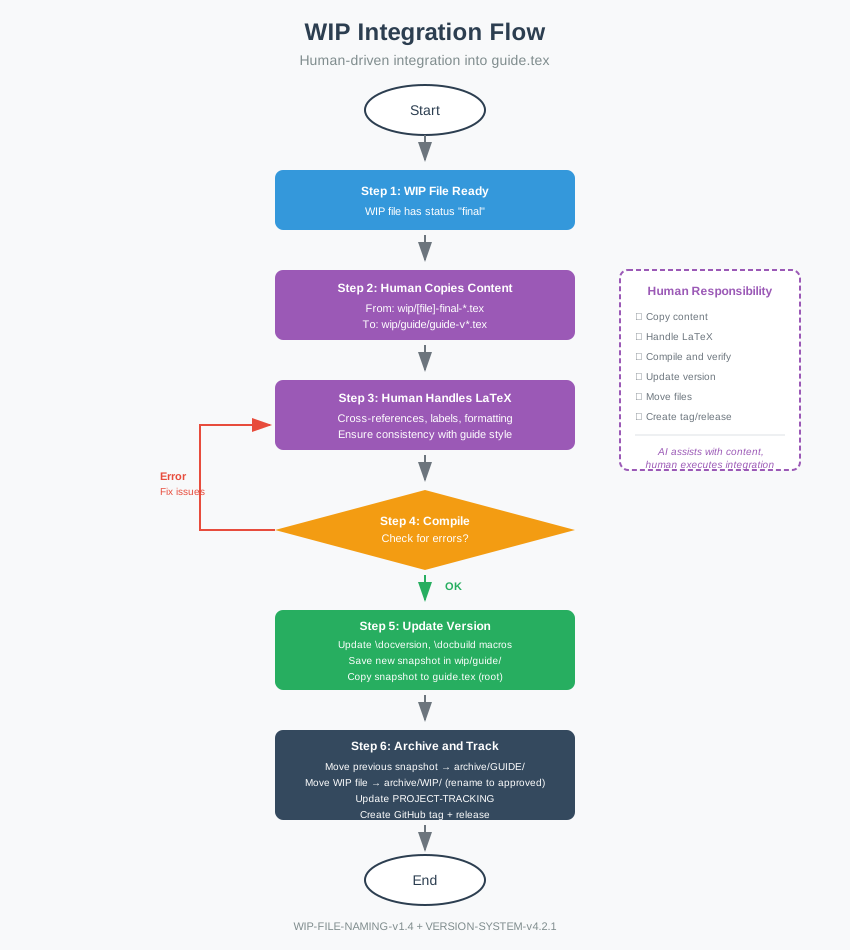
→ Visual reference: WIP Integration Flow
4.1 When to Mark FINAL
A WIP file transitions to final when:
- Content is structurally complete
- Content is narratively complete
- Cross-references verified
- Terminology consistent with rest of guide
- Technical accuracy confirmed against sources
- Author is satisfied — no more iterations needed
4.2 Integration into Main Document
Author is responsible for integration. AI assists with research for content creation and review but does not perform integration.
Workflow:
- Author decides: “Ready to integrate [filename]”
- Author copies content from
finalWIP file into the guide snapshot (wip/guide/guide-v*.tex) - Author handles LaTeX: cross-references, labels, formatting
- Author compiles and verifies no errors
- Author updates version per VERSION-SYSTEM:
- Update
\docversionand\docbuildmacros - Save new snapshot in
wip/guide/ - Copy snapshot to
guide.tex(repository root) - Move previous snapshot to
archive/GUIDE/
- Update
- Author updates PROJECT-TRACKING with integration event
- Author creates GitHub tag and release (see Section 5)
- Author archives WIP file:
- Move from
wip/toarchive/WIP/ - Rename
final→approved
- Move from
4.3 Alpha Integration Workflow
This is a parallel, optional workflow. Use only when pre-release infrastructure is active. The standard workflow in §4.2 remains unchanged.
→ Visual reference: Alpha Supplement
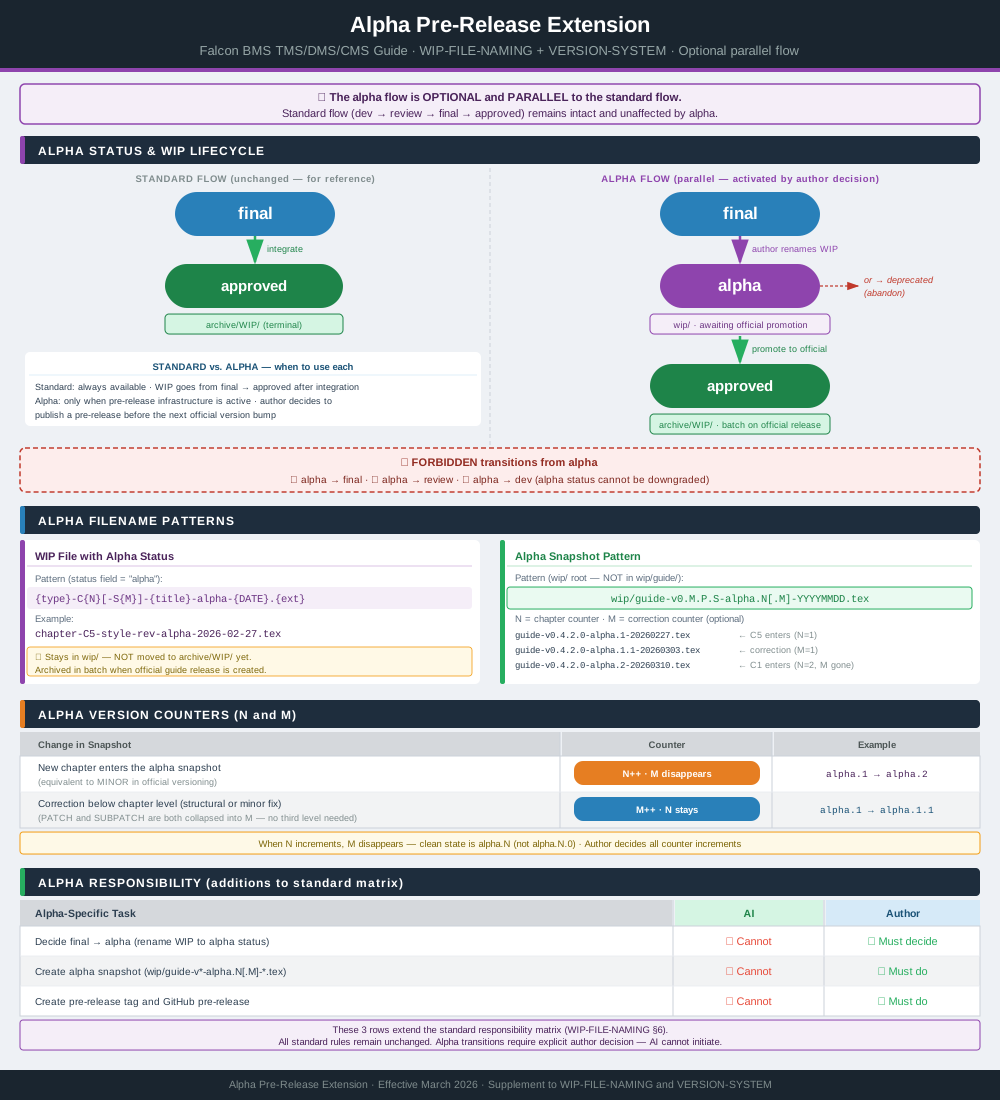
- Author decides: “Ready to create alpha pre-release for [chapter]”
- Author renames WIP file from
finaltoalphastatus - Author creates alpha snapshot in
wip/root:wip/guide-vMAJOR.MINOR.PATCH.SUBPATCH-alpha.N[.M]-YYYYMMDD.tex(cumulative: each new alpha includes all previously alpha-approved chapters) - Author compiles the alpha snapshot locally and commits the PDF to
wip/alongside the.texfile - Author creates Git tag
vMAJOR.MINOR.PATCH.SUBPATCH-alpha.N[.M] - Author creates GitHub pre-release:
- Marked explicitly as pre-release (not a release)
- Description listing chapters included and pending
- WIP file stays in
wip/— NOT moved toarchive/WIP/yet approvedstatus and archival happen when the alpha snapshot is promoted to the official guide release — all alpha WIP files archived in batch at that point
4.4 Archival
archive/WIP/ contains:
*-approved-*.tex— successfully integrated files*-deprecated-*.tex— abandoned files (kept for audit trail)
archive/GUIDE/ contains:
- Previous guide snapshots (
guide-v*.tex) - Alpha pre-release snapshots (
guide-v*-alpha.*.tex) — after the corresponding official release is created
Alpha WIP files (chapter-*-alpha-*.tex): remain in wip/ until the official
guide release, regardless of how many alpha snapshots have been published. At that
point they transition to approved and are moved to archive/WIP/ in batch.
Alpha snapshots (guide-v*-alpha.*.tex): only the current (most recent) alpha
snapshot stays in wip/. Superseded snapshots (alpha.N where N < current) are moved
to archive/GUIDE/ when the next alpha is published. The current snapshot remains in
wip/ until the official release.
5. GitHub Integration
WIP files integrate with GitHub’s project management features:
5.1 Issues
Canonical policy: BRIEFING §10.4 (Traceability: WIP, Issues, Commits).
This document describes the operational mapping used in this repository:
- WIP development is tracked through GitHub Issues.
- Issue titles typically use the chapter/section identifier when applicable (e.g., “C4:S4 — DMS Left/Right”).
- The corresponding issue number must appear in the WIP file’s metadata block (
% Issue: #NN). - Issues are typically closed when the corresponding content is integrated and released.
5.2 Milestones
- Milestones group issues toward a release target
- Milestone name matches version: “v0.3.3.0”, “v0.4.0.0”
- When all milestone issues are closed → release is ready
5.3 Workflow
Standard Flow:
Issue created → WIP file created (dev)
      ↓
Issue updated → WIP iterated (review)
      ↓
Issue ready → WIP approved (final)
      ↓
Integration → Tag + Release → Close Issue → Close Milestone (if complete)
Alpha Flow (parallel, optional):
Issue created → WIP file created (dev)
      ↓
Issue updated → WIP iterated (review)
      ↓
Issue ready → WIP approved (final)
      ↓
[ALPHA BRANCH — only when pre-release active]
Author renames WIP → alpha status
      ↓
Author creates alpha snapshot (wip/guide-v*-alpha.N[.M]-*.tex + PDF)
      ↓
Author creates tag v*.*.*.*-alpha.N[.M] + GitHub pre-release
      ↓
WIP stays in wip/ (awaiting official guide promotion)
      ↓
[RESUMES STANDARD FLOW]
Alpha snapshot promoted to guide.tex → Tag + Release → Close Issue → Close Milestone
Author archives all alpha WIP files (renamed to approved)
6. Responsibility Matrix
| Task | AI | Author |
|---|---|---|
| Generate new WIP file from template | ✅ Can do | — |
Rename dev → review |
⚠️ Only when instructed | ✅ When editing offline |
| Content creation and revision | ✅ Can do | ✅ Can do |
Decide review → final |
❌ Cannot | ✅ Must decide |
Decide → deprecated |
❌ Cannot | ✅ Must decide |
| Integrate into guide snapshot | ❌ Cannot | ✅ Must do |
| Update guide version | ❌ Cannot | ✅ Must do |
Move files to archive/ |
❌ Cannot | ✅ Must do |
Rename to approved |
❌ Cannot | ✅ Must do |
| Create GitHub tag/release | ❌ Cannot | ✅ Must do |
| Update PROJECT-TRACKING | ✅ Can propose | ✅ Must verify/commit |
Decide final → alpha |
❌ Cannot | ✅ Must decide |
| Create alpha snapshot | ❌ Cannot | ✅ Must do |
| Create pre-release tag and GitHub pre-release | ❌ Cannot | ✅ Must do |
7. Quick Reference
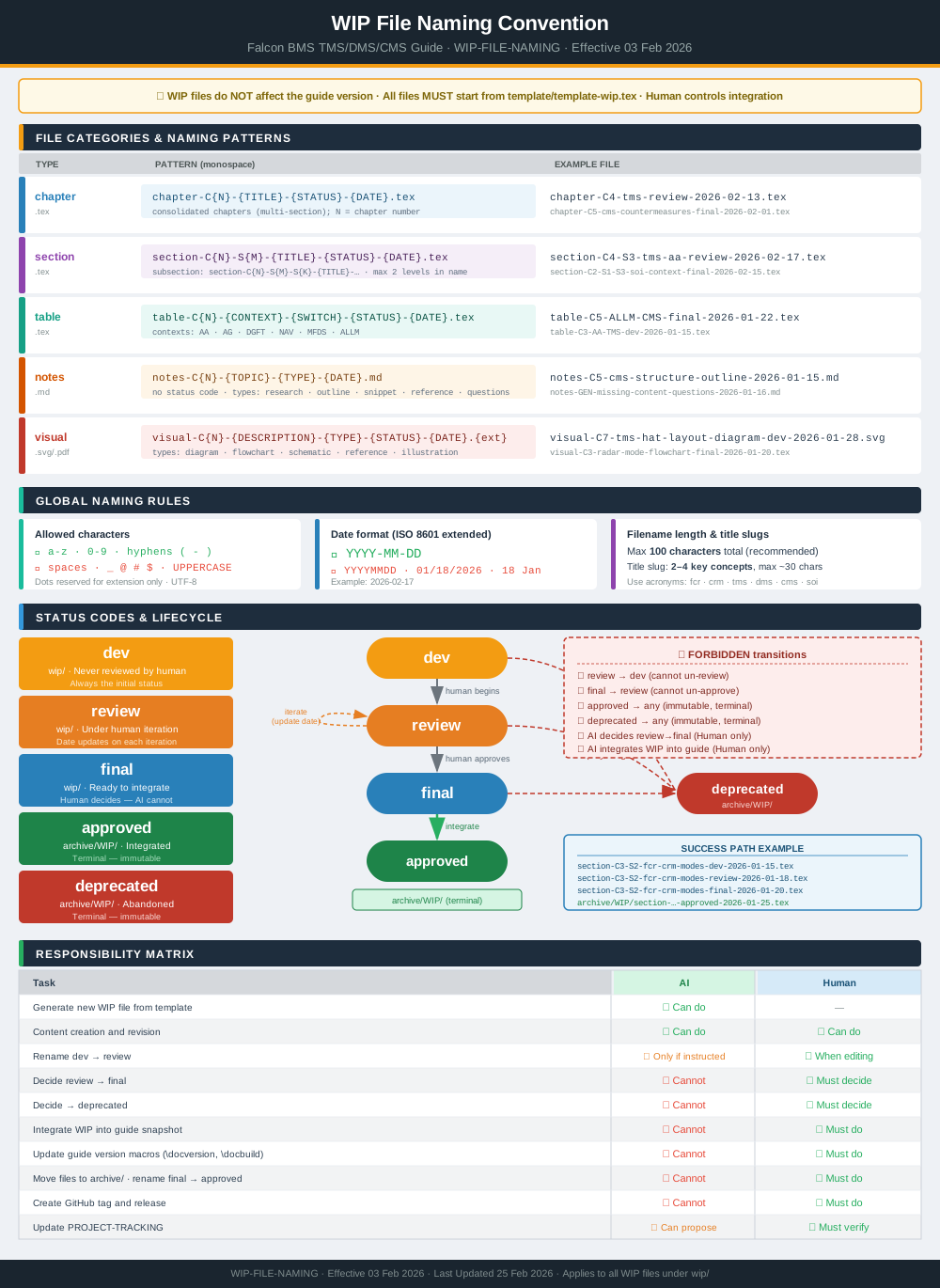
7.1 Naming Patterns
| Type | Pattern |
|---|---|
| Chapter | chapter-C{N}-{title}-{status}-{date}.tex |
| Section | section-C{N}-S{M}-{title}-{status}-{date}.tex |
| Table | table-C{N}-{context}-{switch}-{status}-{date}.tex |
| Notes | notes-C{N}-{topic}-{type}-{date}.md |
| Visual | visual-C{N}-{desc}-{type}-{status}-{date}.{ext} |
→ Visual reference: WIP Naming Diagram
7.2 Status Codes
| Status | Location | Meaning |
|---|---|---|
dev |
wip/ |
Never reviewed |
review |
wip/ |
Under iteration |
final |
wip/ |
Ready to integrate |
alpha |
wip/ |
Integrated into alpha snapshot; awaiting official guide promotion |
approved |
archive/WIP/ |
Integrated |
deprecated |
archive/WIP/ |
Abandoned |
7.3 Folder Structure
| Path | Contents |
|---|---|
wip/ |
Active WIP files; alpha snapshots when pre-release is active |
wip/guide/ |
Current guide snapshot |
archive/WIP/ |
Integrated/deprecated WIP files |
archive/GUIDE/ |
Previous guide snapshots |
template/ |
Canonical WIP template |
7.4 Checklist for AI
When generating filenames, verify:
- ✅ All lowercase
- ✅ Hyphens separate components
- ✅ Date is YYYY-MM-DD
- ✅ Status is valid (
dev,review,final,alpha,approved,deprecated) - ✅ Title is 2-4 key concepts (slugified)
- ✅ Total filename ≤ 100 characters
- ✅ File created from
template/template-wip.tex
8. Relationship to Other Documents
| Document | Responsibility |
|---|---|
| VERSION-SYSTEM | Version numbering for guide.tex and snapshots |
| BRIEFING | Template structure, preamble architecture, layout standards |
| WIP-FILE-NAMING | WIP file naming, status tracking, integration workflow |
| PROJECT-TRACKING | Session log, project state, development history |
Integration points:
- All WIP files start from template (per BRIEFING Section 11)
- WIP files don’t bump versions — only integration does (per VERSION-SYSTEM)
- Integration triggers version bump, tag, and release (per VERSION-SYSTEM Section 6.5)
- All changes logged in PROJECT-TRACKING
Document Status: Production-Ready
Effective Date: 06 March 2026
Last Updated: 24 March 2026