Falcon BMS TMS/DMS/CMS Guide Version System
Latest Update: 01 March 2026 Effective Date: 10 January 2026
Repository Identification
- GitHub repository name:
carlos-nader/tms-dms-cms-usage-guide - Primary URL: https://github.com/carlos-nader/tms-dms-cms-usage-guide
- Default branch:
main - Canonical guide file:
guide.tex(repository root) - Versioned snapshots:
wip/guide/guide-vMAJOR.MINOR[.PATCH[.SUBPATCH]]-YYYYMMDD.tex - Archived snapshots:
archive/GUIDE/guide-v*.tex
0. How to Use This Document
0.1 Initial Question
Before any version change, answer:
- Does the guide already have a published edition (≥ 1.0)?
- No → apply the Pre-publication Regime (0.x.x.x).
- Yes → apply the Post-publication Regime (x.x.x).
0.2 Decision Steps
- Identify the type of change made in the work session:
- Did a new chapter enter the main guide content?
- Was there a strong restructuring of sections or of how tables organize content?
- Were there only small adjustments to text, formatting, or table cells?
- Go to the appropriate “When to Increment” table:
- If still in 0.x.x.x → use Quick Reference (0.x.x.x — pre-publication).
- If already in ≥ 1.0 → use Quick Reference (x.x.x — post-publication).
- Apply the File Naming and Snapshot Workflow:
- Update the version and date macros in the guide’s LaTeX preamble.
- Save an updated snapshot file under
wip/guide/with the new number and date. - Copy this snapshot over
guide.texin the repository root so both files are identical. - Update PROJECT-TRACKING with the new entry.
- Move the previous snapshot to
archive/GUIDE/. - Create a GitHub tag and release for the new version.
- If pre-release infrastructure is active: also consult the Alpha Snapshot Workflow in §6.2 before creating a new official snapshot. Alpha snapshots follow a separate naming pattern (§2.1) and workflow (§6.2).
0.3 Scenario-Based Examples
- “I finished the narrative of a new chapter, tables still incomplete.”
- Regime: 0.x.x.x.
- Trend: MINOR goes up (new chapter with substantive content integrated), PATCH/SUBPATCH reset to 0.
- “I filled part of an important table in an existing chapter, changing how the reader uses that chapter.”
- Regime: 0.x.x.x.
- Trend: PATCH (structural change inside the chapter).
- “I only fixed typos in two chapters, without changing structure or table logic.”
- Regime: 0.x.x.x or x.x.x, depending on current state.
- Trend: SUBPATCH (in 0.x.x.x) or PATCH (in x.x.x).
- “I integrated a fully reviewed section inside an existing chapter (for example CMS 5.2), without adding a new chapter or changing global structure.”
- Regime: 0.x.x.x.
- Trend: PATCH/SUBPATCH depending on scope:
- If the change significantly modifies how that chapter is used (for example, first major HOTAS table for that chapter), increment PATCH (for example,
0.2.2.0 → 0.2.3.0). - If the change is a local refinement on top of an already planned structure, or if you want to keep the change clearly marked as internal polish, increment SUBPATCH (for example,
0.2.2.0 → 0.2.2.1).
- If the change significantly modifies how that chapter is used (for example, first major HOTAS table for that chapter), increment PATCH (for example,
- “A chapter reached
finalWIP status and I want to publish it as a pre-release before the next official version bump.”- Regime: 0.x.x.x (pre-release infrastructure must be active).
- Action: follow the Alpha Snapshot Workflow (§6.2 Phase 1). No official version
bump occurs. The chapter’s WIP file is renamed to
alphastatus. An alpha snapshot is created inwip/root and published as a GitHub pre-release.
1. Header and Scope
1.1 Metadata
- Title: Falcon BMS TMS/DMS/CMS Guide Version System.
-
Role: defines how to name, number, update, and archive versions of the TMS/DMS/CMS guide.
- Current project regime:
- While no edition ≥ 1.0 has been declared, the project is in 0.x.x.x pre-publication regime.
- After the first published edition, the project will combine:
- Historical 0.x.x.x line (frozen).
- Active versions in x.x.x (≥ 1.0, post-publication).
1.2 Purpose
- Establish a versioning system that:
- Clearly distinguishes internal work (0.x.x.x) from published editions (≥ 1.0).
- Aligns MAJOR with the guide “edition”, instead of internal phases (scaffold/tables/review).
- Treats tables as part of chapters, not as independent versions.
1.3 Scope
- Applies to:
- Canonical main guide source file in the repository root:
guide.tex. - Versioned guide snapshots in
wip/guide/following theguide-v*.texpattern. - Archived snapshots in
archive/GUIDE/. - Derived artefacts: versioned PDFs, tracking documents (
PROJECT-TRACKING-*.md), briefings. - Individual preparation file names follow their own rules defined in the separate
WIP-FILE-NAMINGdocument (section-,chapter-,table-,visual-,notes-).
- Canonical main guide source file in the repository root:
- Does not apply to other projects outside the TMS/DMS/CMS Guide unless explicitly stated.
1.4 Version Fields in the Guide’s LaTeX
The guide contains version and date macros in the preamble, for example:
\newcommand{\docversion}{0.3.3.0}     % Document version number
\newcommand{\docbuild}{20260202}      % Build date YYYYMMDD
\newcommand{\docstartdate}{05 January 2026}
\newcommand{\docenddate}{DD MMM 2026}
\newcommand{\chapterscompletedof}{3/7}
\newcommand{\tablesfilledpct}{0\%}
\newcommand{\fulldocversion}{\docversion+\docbuild}
These macros are the internal source of truth for the document version.
On every version change:
\docversionand\docbuildmust be updated to reflect the new version and new date.\fulldocversionand derived fields (cover page, status section, etc.) start displaying the new value.
The version number stored in these macros must always match:
- The number encoded in the snapshot file name under
wip/guide/. - The number recorded in PROJECT-TRACKING.
- The GitHub tag for that release.
1.5 Repository Structure and GitHub Workflow
To align the version system with GitHub branch protection and readable diffs, the repository follows these rules:
- The repository root contains a single canonical main file:
guide.tex. - The directory
wip/guide/contains the current snapshot named with the full version pattern, for example:wip/guide/guide-v0.3.3.0-20260202.tex.
- When pre-release infrastructure is active,
wip/(root, notwip/guide/) also contains alpha pre-release snapshots:wip/guide-vMAJOR.MINOR.PATCH.SUBPATCH-alpha.N-YYYYMMDD.texThese coexist with WIP content files and are governed by this document (§2.1, §6.5). They are NOT subject to the single-file rule ofwip/guide/.
- The directory
archive/GUIDE/contains previous snapshots for historical reference, including alpha pre-release snapshots after the corresponding official release is created. - Editing rule:
- All substantive editing of the guide is done via WIP files (
chapter-*.tex,section-*.tex) that follow the workflow defined inWIP-FILE-NAMING. - When WIP content is integrated into the guide, an updated snapshot is created in
wip/guide/. - The snapshot is then copied to
guide.texin the repository root, overwriting the previous version. - The previous snapshot is moved to
archive/GUIDE/. guide.texmust not be edited directly; any change to its content must originate from WIP files or the current snapshot inwip/guide/.
- All substantive editing of the guide is done via WIP files (
- Git and GitHub treat
guide.texas the canonical history of the document, providing line-by-line diffs across commits.
2. Global Naming Convention
2.1 Snapshot File Name Rule
Every snapshot of the main guide stored in wip/guide/ must follow this pattern:
guide-vMAJOR.MINOR[.PATCH[.SUBPATCH]]-YYYYMMDD.tex
MAJOR,MINOR,PATCH,SUBPATCHare integers ≥ 0.YYYYMMDDis the build date (year, month, day).
The root file guide.tex keeps a stable name and is always a byte-identical copy of the latest snapshot that represents the active version.
Alpha pre-release snapshots follow a separate pattern and reside in wip/ root:
wip/guide-vMAJOR.MINOR.PATCH.SUBPATCH-alpha.N[.M]-YYYYMMDD.tex
Nis the chapter-level counter: increments when a new chapter enters the snapshotM(optional) is the patch-level counter: increments for any correction below chapter level within the same chapter set; whenNincrements,Mdisappears (e.g.,alpha.1.2→alpha.2, notalpha.2.0)YYYYMMDDis the build date (same rule as official snapshots per §6.1; do NOT recreate with a new date if content is unchanged)- The file lives in
wip/root — NOT inwip/guide/ - Multiple alpha snapshots may coexist in
wip/(one per pre-release increment)
2.2 Date Format
- The date always uses the format
YYYYMMDD(for example,20260202for 02 February 2026). - The build date is updated whenever:
- A new version number is created (bump in any digit).
- A relevant snapshot is compiled, even without content change, when the artefact is to be archived.
2.3 Examples
- Pre-publication (0.x.x.x regime) snapshots:
- Active:
wip/guide/guide-v0.3.3.0-20260202.tex - Archived:
archive/GUIDE/guide-v0.3.2.1-20260129.tex
- Active:
- First published edition (≥ 1.0 regime, after promotion):
wip/guide/guide-v1.0.0-2026XXXX.tex
- Major revision in a new edition:
wip/guide/guide-v2.0.0-2026XXXX.tex
- Pre-release alpha snapshots (in
wip/root):wip/guide-v0.4.2.0-alpha.1-20260227.tex← C5 enters snapshot (N=1)wip/guide-v0.4.2.0-alpha.1.1-20260303.tex← correction in C5 (M=1)wip/guide-v0.4.2.0-alpha.2-20260310.tex← C1 enters snapshot (N=2, M gone)
3. Pre-Publication Regime (0.x.x.x)
3.1 Semantics of Digits in 0.x.x.x
During pre-publication, the version number has four digits:
0.MINOR.PATCH.SUBPATCH
- MAJOR = 0
- Indicates the guide is in an internal development line, still unpublished.
- Structure can change significantly (chapters entering, leaving, being reordered) with no stability commitment to the reader.
- MINOR (2nd digit)
- Represents each chapter with substantive content integrated into the guide.
- Increments when a new chapter gains real narrative content (not just scaffolding/placeholders).
- The order of MINOR increments reflects the order chapters were developed, not their chapter number.
- Examples:
0.1.x.x→ 1st chapter with content (C1 Introduction).0.2.x.x→ 2nd chapter with content (C5 CMS).0.3.x.x→ 3rd chapter with content (C4 DMS).- … up to
0.7.x.xwhen all 7 planned chapters have substantive content.
- PATCH (3rd digit)
- Marks relevant structural changes inside the chapter(s) active under that MINOR:
- Addition of new important sections.
- Reorganisation of sections/subsections.
- Introduction or reformulation of tables in ways that change how the chapter is used.
- Marks relevant structural changes inside the chapter(s) active under that MINOR:
- SUBPATCH (4th digit)
- Logs smaller refinements without significant structural change:
- Spelling and typo corrections.
- Small wording improvements.
- Localised tweaks in table cells, footnotes, or formatting.
- Logs smaller refinements without significant structural change:
3.2 Increment Rules in 0.x.x.x
Only MAJOR is fixed (0); the other digits vary according to change type.
3.2.1 Central Rule
- Only content that reaches the guide snapshot in
wip/guide/and the correspondingguide.texcopy in the repository root can trigger MINOR/PATCH/SUBPATCH bumps.- Work left only in other WIP files (
chapter-...tex,section-...tex,table-...tex,visual-...{svg,pdf,png,tex},notes-...md, drafts) does not change the version number until integrated into the snapshot and propagated toguide.tex.
- Work left only in other WIP files (
3.2.2 “When to Increment (Pre-Publication)” Table
| Situation | Increment | Note |
|---|---|---|
| Integrate a new chapter with substantive content | MINOR | Example: 0.2.x.x → 0.3.0.0. |
| Add a new relevant section in an already active chapter | PATCH | Example: 0.3.1.0 → 0.3.2.0. |
| Restructure chapter sections/subsections | PATCH | Keeps MINOR; changes internal architecture. |
| Fill/modify tables in a way that changes how the chapter is used | PATCH | Example: new HOTAS table that reorganises reading. |
| Fix LaTeX syntax errors that prevented compilation | PATCH | Structural “major bugfix”. |
| Fix typos, punctuation, small wording adjustments | SUBPATCH | Example: 0.3.2.0 → 0.3.2.1. |
| Adjust few table cells without changing logic/structure | SUBPATCH | Local refinement. |
| Only compile/save, with no content change | Date | Update YYYYMMDD, not version number. |
Work in non-integrated WIP (chapter-...tex, section-...tex, etc.) |
None | Version only goes up when content enters the snapshot and guide.tex. |
| Create alpha snapshot (pre-release infrastructure active) | None | Alpha versioning is separate from the official version line (see §6.5.1). |
3.2.3 Internal Phases as Metadata
- Phases like “chapter scaffolding”, “table filling”, “review” are treated as progress metadata, not as direct triggers for MAJOR changes in 0.x.x.x.
- These phases can show up:
- In PROJECT-TRACKING.
- In the guide’s own status section.
3.3 Role of Tables in 0.x.x.x
3.3.1 Tables as Part of Chapters
- The
hotastableenvironment is defined as a presentation medium, not as an independent structural unit. - TMS, DMS, and CMS tables:
- Are always part of sections/chapters (Ch. 3, 4, 5, etc.).
- Are indexed in the table appendix, reinforcing that they belong to main chapters.
3.3.2 Tables and Version Increments
- PATCH because of tables when:
- Inclusion, removal, or large reformulation of a table:
- Changes how the reader navigates or understands the chapter.
- Reorganises content (for example, replacing free text with a central reference table).
- Inclusion, removal, or large reformulation of a table:
- SUBPATCH because of tables when:
- Adjustments:
- Fix cell descriptions, typos, or references.
- Add/remove few rows without changing overall logic.
- Adjust formatting, reference notes, or similar details.
- Adjustments:
3.4 Practical Examples (0.x.x.x)
3.4.1 Actual Pre-Publication Evolution
The following reflects the actual progression of the guide:
| Version | Date | Content Integrated |
|---|---|---|
v0.1.0.0 |
2026-01-05 | C1 Introduction — initial structure |
v0.2.0.1 |
2026-01-07 | C5 CMS Section 5.1 integrated (2nd chapter with content) |
v0.2.4.0 |
2026-01-12 | C5 CMS complete (§5.1, §5.2, §5.3) |
v0.3.0.0 |
2026-01-15 | C4 DMS Sections 4.1 and 4.2 integrated (3rd chapter with content) |
v0.3.1.0 |
2026-01-18 | Preamble infrastructure upgrade (article → report class) |
v0.3.2.0 |
2026-01-19 | C4 DMS Section 4.3 integrated |
v0.3.2.1 |
2026-01-29 | Hotastable environment upgrade, C4/C5 corrections |
v0.3.3.0 |
2026-02-02 | C4 DMS complete (§4.4), C1 Introduction revised |
v0.4.0.0 |
2026-02-10 | C2 HOTAS Fundamentals + C3 DMS integrated; chapter renumbering (DMS: C4→C3, TMS: C3→C4) |
v0.4.1.0 |
2026-02-11 | Infrastructure upgrades: hotastable v2.1, cross-reference macros, List of HOTAS Tables |
v0.4.1.1 |
2026-02-18 | Minor wording corrections; missing \label tags added to C5 hotastable environments |
Projected future:
v0.5.0.0— C4 TMS integrated (5th chapter with content)v0.6.0.0— C6 Quick Reference integrated (all 6 chapters complete)
3.4.2 Mini-Cases by Scenario
- Case A — New chapter with content enters the guide:
- Situation: C4 DMS gains its first substantive sections (4.1 and 4.2).
- Action: integrate content into snapshot and propagate to
guide.tex. - Version:
0.2.4.0 → 0.3.0.0(MINOR bump).
- Case B — New section integrated in existing chapter:
- Situation: C4 DMS Section 4.3 added to already-active Chapter 4.
- Version:
0.3.1.0 → 0.3.2.0(PATCH).
- Case C — Infrastructure/preamble change:
- Situation: document class changed from article to report, affecting entire guide.
- Version:
0.3.0.1 → 0.3.1.0(PATCH — structural change).
- Case D — Typo fixes and minor corrections:
- Situation: only typos and micro wording adjustments across chapters.
- Version:
0.3.2.0 → 0.3.2.1(SUBPATCH).
4. Bridge to Publication (0.x.x.x → 1.0)
4.1 Criteria to Declare 1.0
A 0.a.b.c version can be promoted to 1.0.0 when all criteria below are met:
- Overall chapter structure is stable.
- All chapters planned for the 1st edition exist and have basic narrative complete.
- The chapter index reflects the structure to be “frozen” for readers.
- Guide is practically usable.
- A reader can follow the flow and use TMS/DMS/CMS based on existing text.
- Tables may be partial, as long as this is clearly indicated (for example, labels like “In development” or explanatory notes).
- Minimum consistency and clarity review done.
- Unified terminology (mode names, commands, displays, etc.).
- Critical references (Dash-1, Dash-34, BMS manuals) checked at key points.
4.2 Transition Procedure
- Choose base 0.a.b.c.
- Select, among existing 0.x.x.x versions, the one that best represents the state “ready for 1.0”.
- Confirm it meets the criteria in Section 4.1.
- Create version 1.0.0.
- Update macros in the guide LaTeX snapshot:
\newcommand{\docversion}{1.0.0} \newcommand{\docbuild}{YYYYMMDD} % Date when 1st edition is frozen - Save the snapshot with the new name under
wip/guide/:wip/guide/guide-v1.0.0-YYYYMMDD.tex - Copy this snapshot over
guide.texin the repository root so both files are identical.
- Update macros in the guide LaTeX snapshot:
- Freeze the 0.x.x.x line.
- Ensure all
guide-v0.*.texfiles are inarchive/GUIDE/. - Do not create new 0.* versions after 1.0.0 is born.
- The 0.x.x.x line becomes pre-publication history only.
- Ensure all
- Update tracking and GitHub.
- In PROJECT-TRACKING, record:
- Which
0.a.b.cversion was promoted to1.0.0. - A short editorial justification for promotion (why this is the 1st edition).
- Which
- Create GitHub tag
v1.0.0and corresponding release with changelog.
- In PROJECT-TRACKING, record:
4.3 Cutover between Regimes
- From the build date recorded in
\docbuildof version1.0.0onward:- All new changes to the guide must follow the x.x.x regime described in Chapter 5.
- That is, any new version takes the form
1.MINOR.PATCH, then2.MINOR.PATCH, and so on.
4.4 Checklist before Promoting to 1.0.0
Before performing the transition, validate:
\chapterscompletedofand the chapter index correctly reflect the 1st edition’s state.- There are no obvious internal markers (like “TODO”, “FIXME”, temporary comments) in the main sections.
- Partial tables are clearly identified as such and do not look like errors.
- PROJECT-TRACKING is consistent with the state to be frozen as 1.0.0 (dates, versions, change descriptions).
- If pre-release infrastructure was active during 0.x.x.x development: confirm that
all alpha snapshots (
wip/guide-v*-alpha.*.tex) are either promoted or deprecated before freezing the 0.x.x.x line. No alpha snapshots should remain inwip/after the 1.0.0 transition.
5. Post-Publication Regime (≥ 1.0, x.x.x Scheme)
From
1.0.0onwards, the focus moves from internal development to edition and revision management for readers.
5.1 Semantics of Digits in x.x.x
After the first published edition, the guide uses:
MAJOR.MINOR.PATCH
- MAJOR (1st digit) — Guide edition.
- Represents main editions (1st, 2nd, 3rd, …).
- Should only change when there are broad enough changes to justify calling it a new edition.
- Typical examples:
- Large chapter reorganisation (merges, splits, strong order changes).
- Addition/removal of large content blocks that alter global scope.
- Adaptation to a new major BMS version requiring substantial rewrite of several chapters.
- MINOR (2nd digit) — Compatible but substantial changes.
- Marks important revisions, but still within the same edition.
- A reader of the current edition does not get lost when moving to a new MINOR:
- Index and overall structure remain recognisable.
- Examples:
- Addition of a new relevant chapter.
- Large expansion of existing chapters (new sections and key tables).
- Relevant internal reorganisation of a subset of chapters while keeping global architecture.
- PATCH (3rd digit) — Smaller corrections and adjustments.
- Logs fine-tuning within the same MINOR:
- Spelling, grammar, formatting fixes.
- Clarity improvements in paragraphs, captions, notes.
- Small table, note, reference adjustments.
- Local error corrections without large restructuring.
- Logs fine-tuning within the same MINOR:
5.2 General Increment Rules in x.x.x
5.2.1 General Principles
- Editorial compatibility.
- If the reader can use the new version as a drop-in replacement for the previous one, without relearning global structure → generally not MAJOR.
- If the new version requires rethinking stable references (chapter number, global order) → candidate for MAJOR.
- Frequency.
- MAJOR is rare (editions).
- MINOR is less rare, but still signals important revisions.
- PATCH can happen more frequently (errata, polish).
- Continuity with 0.x.x.x.
- 0.x.x.x becomes pre-publication history; in ≥ 1.0, avoid unnecessary architecture resets.
5.2.2 “When to Increment (Post-Publication)” Table
| Situation | Inc. | Comment |
|---|---|---|
| Reorganise chapter structure (merges, splits, large order changes) | MAJOR | Reader sees it as a new edition of the guide. |
| Add/remove large content blocks that change global scope | MAJOR | For example, whole new part, or removal of a dominant part. |
| Adapt guide to a new major BMS version with substantial rewrite of several chapters | MAJOR | Old content is no longer fully current. |
| Add a new important chapter within the same edition | MINOR | Scope expands, edition remains the same. |
| Substantially expand one or more chapters (new sections, key tables) | MINOR | Significant improvement without breaking global organisation. |
| Reorganise internally a subset of chapters, keeping index recognisable | MINOR | Revised edition within same MAJOR. |
| Correct several localised content errors in text/tables | PATCH | Focus on fixing, not expanding scope. |
| Fix typos, grammar, improve clarity, update references | PATCH | Typical errata/polish versions. |
| Adjust few table cells, change labels without altering logic | PATCH | No chapter renumbering or flow changes. |
5.3 Role of Tables in ≥ 1.0
- Tables are part of chapters, not MAJOR artefacts:
- A new large, central table in an important chapter:
- May justify MINOR, if expansion is substantial.
- Or PATCH, if it is just a refinement of already described content.
- A new large, central table in an important chapter:
- Localised table corrections (cells, acronyms, notes):
- Tend to be PATCH, unless the change is so broad that it modifies the logic of a key section (then evaluate MINOR).
5.4 Example Progression in x.x.x
5.4.1 From the 1st Edition Onward
1.0.0— 1st published edition.- Stable chapter structure, usable narrative, tables present and clearly marked when partial.
1.0.1— Initial errata.- Typo fixes, small errors in TMS/DMS/CMS descriptions, localised formatting tweaks.
1.1.0— Expanded revision within 1st edition.- Addition of one new relevant chapter (for example, advanced training flows).
- Some tables originally from 0.x.x.x have been completed.
1.1.3— Third set of minor fixes on top of 1.1.0.1.1.1,1.1.2,1.1.3accumulate errata and clarifications.
2.0.0— 2nd revised edition.- Several chapters regrouped, order revised, broad updates to follow a new major BMS version.
5.4.2 Decision Examples
- Case 1 — New chapter “TMS/DMS/CMS in additional aircraft” in 1.x.
- Global structure stays recognisable →
1.0.2 → 1.1.0(MINOR).
- Global structure stays recognisable →
- Case 2 — Fixing incorrect commands in CMS tables.
- Cell-level fixes, no chapter restructuring →
1.1.0 → 1.1.1(PATCH).
- Cell-level fixes, no chapter restructuring →
- Case 3 — Reorganising training part (Ch. 6) into two parts.
- If only part of structure changes, with recognisable index → MINOR.
- If it triggers wide architecture changes → evaluate MAJOR.
5.5 Interaction with 0.x.x.x History
- 0.x.x.x versions:
- Kept as pre-publication history, useful for understanding evolution and didactic decisions.
- After
1.0.0:- No new 0.* versions are created.
- All future changes follow x.x.x regime.
5.6 Quick Checklist for ≥ 1.0
- Does your change alter the edition (reader should perceive it as a new edition)?
- Yes → MAJOR (for example
1.3.2 → 2.0.0). - No → continue.
- Yes → MAJOR (for example
- Does your change significantly expand scope or reorganise an important part, while staying in same edition?
- Yes → MINOR (for example
1.0.0 → 1.1.0). - No → continue.
- Yes → MINOR (for example
- Is your change local (fixes, clarifications, small table/text adjustments)?
- Yes → PATCH (for example
1.1.0 → 1.1.1).
- Yes → PATCH (for example
6. Rules Common to Both Regimes
6.1 Build Date and Compilation
- Build date (
YYYYMMDD) must be updated whenever:- A new version number (0.x.x.x or x.x.x) is established.
- A relevant snapshot is compiled and saved.
- Difference between internal snapshot and official version:
- Only versions whose number was updated in
\docversionand in the snapshot file name enter PROJECT-TRACKING as milestones.
- Only versions whose number was updated in
- For alpha snapshots, the same rule applies: update
YYYYMMDDwhen the alpha snapshot is first compiled. Do NOT recreate with a new date if content is unchanged (applies to bothalpha.Nandalpha.N.Mincrements).
6.2 File Naming and Snapshot Workflow
Single workflow for 0.x.x.x and x.x.x:
- Determine change type.
- Use the appropriate “When to Increment” tables (pre- or post-publication).
- Update version/date macros in LaTeX.
- Set
\docversionto the new number. - Set
\docbuildto the newYYYYMMDDdate. - Ensure
\fulldocversionreflects the correct combination.
- Set
- Compile and check for errors.
- Generate the PDF and check LaTeX warnings/errors.
- Save the snapshot under
wip/guide/.- Apply the pattern:
wip/guide/guide-vMAJOR.MINOR[.PATCH[.SUBPATCH]]-YYYYMMDD.tex
- Apply the pattern:
- Propagate to the canonical file.
- Copy the new snapshot over
guide.texin the repository root so that Git/GitHub see the change as an update of the same file.
- Copy the new snapshot over
- Archive previous snapshot.
- Move the previous
guide-v*.texfromwip/guide/toarchive/GUIDE/.
- Move the previous
- Update PROJECT-TRACKING.
- Add a line with version, date, affected chapter(s), and a concise description of the change.
- Create GitHub tag and release.
- See Section 6.5 for details.
→ Visual reference: WIP Integration Flow
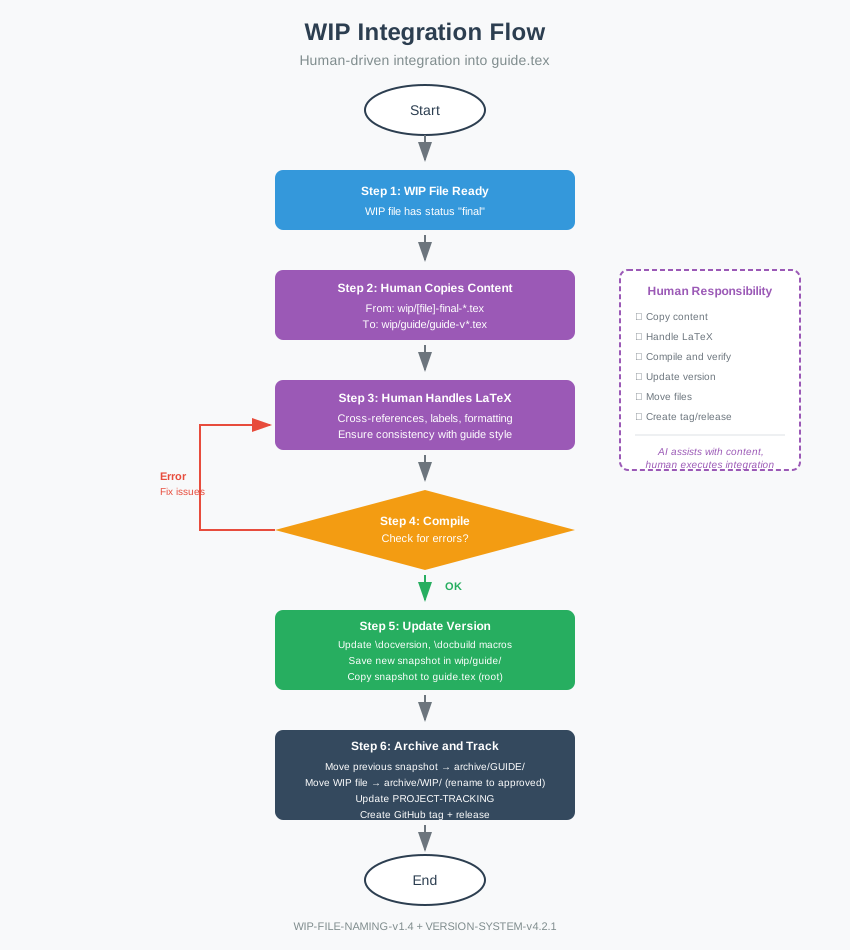
Alpha Snapshot Workflow (parallel, optional):
For pre-release alpha snapshots (activated only when pre-release infrastructure is in progress):
Phase 1 — Creating the alpha pre-release:
- Determine content. Identify which chapters have reached
alphaWIP status. A WIP file transitions toalphawhen the author decides to include it in a pre-release snapshot (see WIP-FILE-NAMING §3.3.1 for thefinal → alphatransition rules). - Create alpha snapshot. Starting from either the current
wip/guide/guide-v*.texsnapshot or the template (template/template-wip.tex), integrate all alpha-approved chapters (cumulative — alpha.N includes all previously alpha-approved content). Save as:wip/guide-vMAJOR.MINOR.PATCH.SUBPATCH-alpha.N[.M]-YYYYMMDD.tex - Compile and check. Generate PDF from the alpha snapshot. Verify no errors.
- Create Git tag. Tag format:
vMAJOR.MINOR.PATCH.SUBPATCH-alpha.N[.M] - Create GitHub pre-release. Mark explicitly as pre-release. Attach compiled PDF.
Note: The official snapshot in wip/guide/ is NOT updated during Phase 1.
Alpha snapshots remain in wip/ root until promoted to official.
Phase 2 — Promoting alpha to official:
- Rename to official snapshot. Drop
-alpha.N[.M]from the final alpha snapshot name and save towip/guide/guide-vMAJOR.MINOR.PATCH.SUBPATCH-YYYYMMDD.tex. - Resume standard workflow. Follow steps 3–8 above (compile, propagate to
guide.tex, archive previous snapshot, update PROJECT-TRACKING, create official tag and release). - Archive alpha snapshots and WIP files. Move all
guide-v*-alpha.*.texfromwip/root toarchive/GUIDE/. Rename all associated WIP files fromalpha→approvedstatus and move them toarchive/WIP/in batch (see WIP-FILE-NAMING §4.3).
→ Visual reference: Alpha Supplement
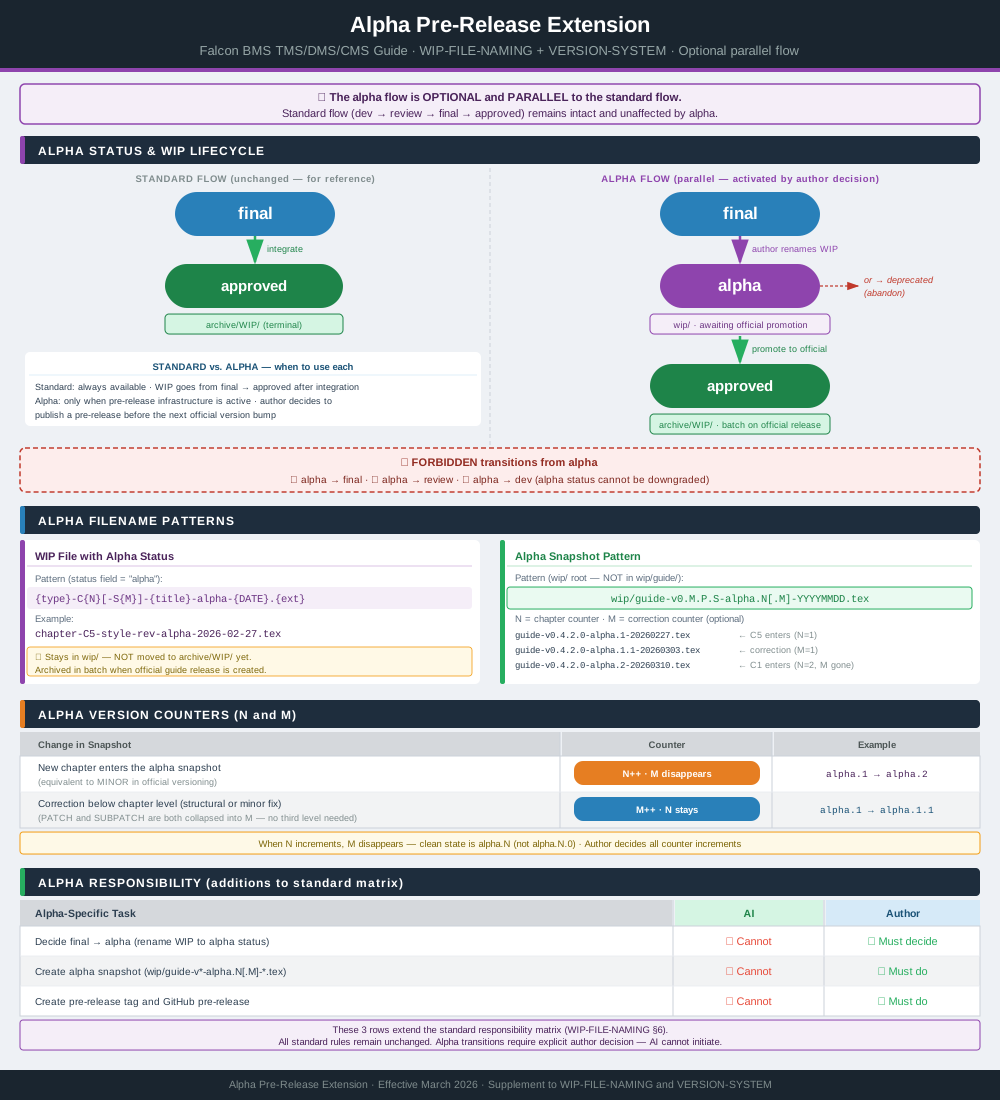
6.3 Archival Strategy
- Active snapshot:
wip/guide/guide-v{current}.tex - Archived snapshots:
archive/GUIDE/guide-v{previous}.tex - Only one snapshot should be in
wip/guide/at a time (the current version). - All previous versions are preserved in
archive/GUIDE/for historical reference.
Alpha snapshots: Only the current (most recent) alpha snapshot remains in wip/
root. When a new alpha is published (N increments), the previous snapshot is superseded
and may be moved to archive/GUIDE/ immediately. The current alpha snapshot stays in
wip/ until the official release is created, at which point it is also moved to
archive/GUIDE/. Alpha WIP files (chapter-*-alpha-*.tex) are unaffected by this
rule — they remain in wip/ until the official release.
6.4 Relationship with WIP File Naming and BRIEFING
- This document (Version System) governs the versioning and naming of the guide snapshots (
wip/guide/guide-v*.tex) and their relationship with the canonicalguide.texin the repository root. - Individual preparation files (
chapter-,section-,table-,visual-,notes-) follow their own rules defined in the separateWIP-FILE-NAMINGdocument. - The structural specification and template governance for WIP files is defined in
BRIEFING(Section 11). - These WIP files only impact the guide version when their content is integrated into the current snapshot and propagated to
guide.tex.
6.5 GitHub Integration: Tags, Releases, and Milestones
The version system integrates with GitHub’s release management features:
6.5.1 Tags
- Every version bump must have a corresponding Git tag.
- Tag format:
vMAJOR.MINOR.PATCH.SUBPATCH(e.g.,v0.3.3.0) - Tags are created after the snapshot is propagated to
guide.texand committed. - Tags provide permanent markers in Git history for each version.
Alpha (pre-release) tags:
- Format:
vMAJOR.MINOR.PATCH.SUBPATCH-alpha.N[.M] - Examples:
v0.4.2.0-alpha.1·v0.4.2.0-alpha.1.1·v0.4.2.0-alpha.2 - Alpha tags are created before the official
vMAJOR.MINOR.PATCH.SUBPATCHtag - Multiple alpha tags may exist for the same target version (one per pre-release)
Alpha version increment rules (parallel to the canonical version-system):
| Change in snapshot | Canonical equivalent | Alpha counter |
|---|---|---|
| New chapter added to snapshot | MINOR | N++ — M disappears (alpha.2) |
| Any correction below chapter level (structural or minor) | PATCH or SUBPATCH | M++ (alpha.1.1, alpha.1.2) |
Notes:
- When N increments, M disappears: the clean state is
alpha.N, notalpha.N.0 - PATCH and SUBPATCH are collapsed into M — no third level needed
- Decision authority: author only (same as all version decisions)
6.5.2 Releases
- Every tag should have a corresponding GitHub Release.
- Release content includes:
- Title: Version number (e.g., “v0.3.3.0”)
- Description: Summary of changes (chapters/sections integrated, fixes applied)
- Assets: Compiled PDF (
guide.pdf) - Link to previous release for comparison
- Releases provide user-friendly access to each version with changelog.
Pre-releases (alpha):
- Must be marked explicitly as pre-release in GitHub (not as a full release)
- Title:
v0.4.2.0-alpha.1(version only — no descriptive suffix) - Description: list which chapters are included and which are pending
- Assets: compiled PDF generated from the alpha snapshot (not from
guide.tex) - Pre-releases do NOT replace the current official release
- If the corresponding WIP is later deprecated, the pre-release tag stays as a historical record — no GitHub cleanup needed
6.5.3 Milestones
- Milestones group issues that contribute to a specific version release.
- Milestone naming: matches target version (e.g., “v0.3.3.0”, “v0.4.0.0”)
- Milestone description includes:
- Overview of planned content
- Issue workflow (DEV → REVIEW → FINAL → APPROVED)
- Technical requirements
- Version bump rationale
- Milestones provide project planning and progress tracking.
6.5.4 Workflow Integration
Issues (in Milestone) → WIP files → Integration → Snapshot → guide.tex → Tag → Release
                                                                                    ↓
                                                                          Close Milestone

ALPHA PATH (parallel, optional):
WIP files (final) → [author decides alpha] → alpha status → Alpha Snapshot (wip/) → Alpha Tag → Pre-Release
                                                                                                    ↓
                                                                              (awaits official integration)
                                                                                         ↓
                                                                          Official flow resumes from Integration
Note: Promotion from alpha to official (Phase 2) requires an explicit author decision — it does not happen automatically.
- Issues track individual work items (sections, fixes, improvements)
- Milestones aggregate issues toward a release target
- When all milestone issues are closed and content is integrated:
- Create snapshot and propagate to
guide.tex - Commit with descriptive message
- Create Git tag
- Create GitHub Release
- Close milestone (if 100% complete)
- Create snapshot and propagate to
7. Consolidated Quick Reference
→ Visual reference: Version System Diagram
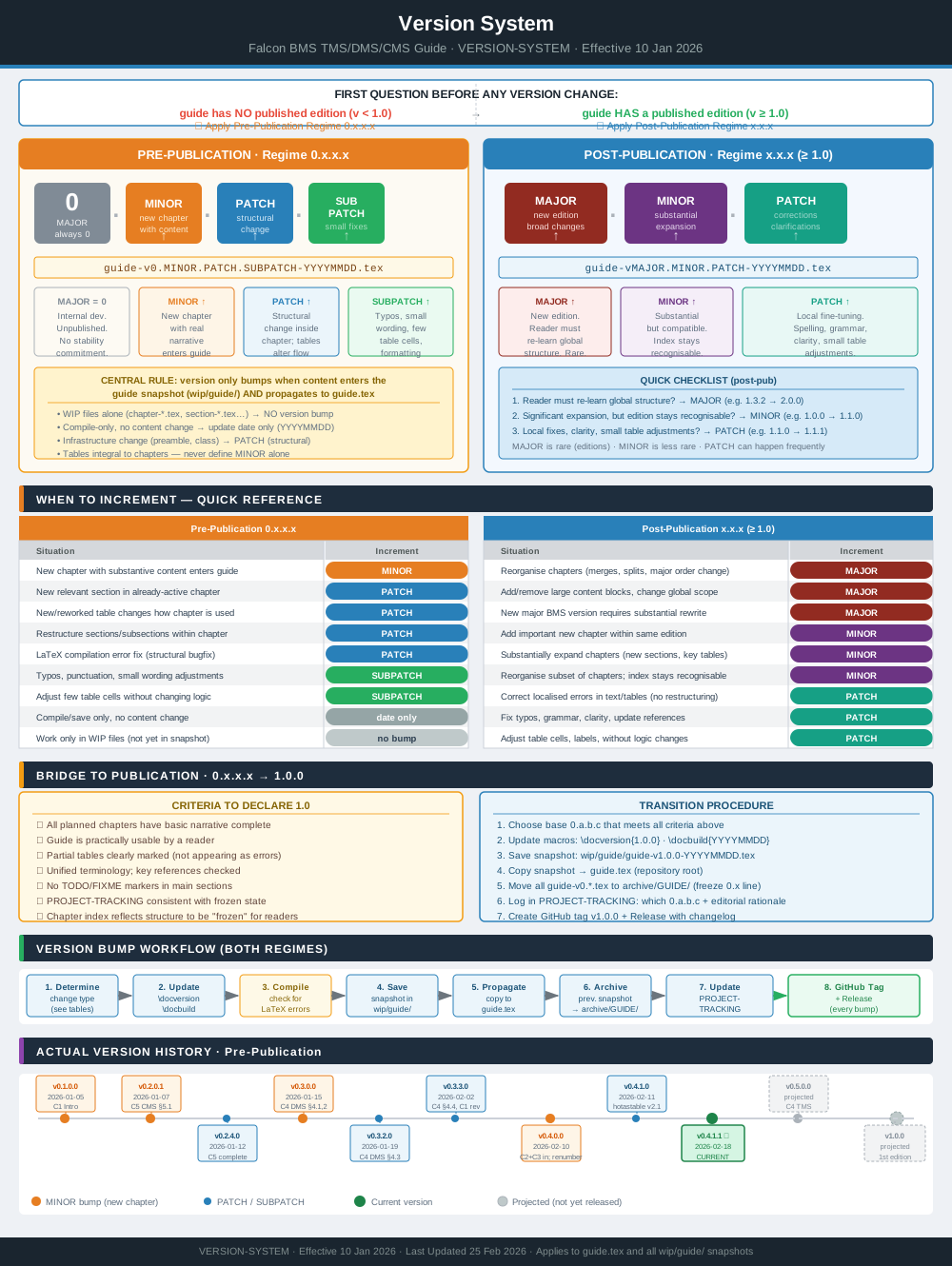
7.1 Quick Reference (0.x.x.x — Pre-Publication)
- MAJOR = 0 always.
- MINOR: new chapter with substantive content enters guide.
- PATCH: structural change in chapter (sections/tables altering flow).
- SUBPATCH: fine-tuning (typos, wording, small table tweaks).
| Key Situation | Pre Version (ex.) | Post Version (ex.) |
|---|---|---|
| New chapter with content enters guide | 0.2.4.0 → 0.3.0.0 |
— |
| New section in existing chapter | 0.3.1.0 → 0.3.2.0 |
— |
| Important table changes chapter usage | 0.3.2.0 → 0.3.3.0 |
— |
| Typos and micro wording fixes | 0.3.2.0 → 0.3.2.1 |
— |
7.2 Quick Reference (x.x.x — Post-Publication)
- MAJOR: new edition (broad changes, potential incompatibility).
- MINOR: compatible but substantial expansion (new chapters, large blocks).
- PATCH: minor corrections, clarifications, localised adjustments.
| Key Situation | Pre Version (ex.) | Post Version (ex.) |
|---|---|---|
| Second revised edition (broad change) | — | 1.3.2 → 2.0.0 |
| Important new chapter within same edition | — | 1.0.0 → 1.1.0 |
| Minor fixes and clarifications on 1.1.0 | — | 1.1.0 → 1.1.1 |
7.3 Key Notes
- Tables are always part of chapters; they never define MAJOR alone.
- 0.x.x.x is never a published edition; it is always an internal development regime.
1.0marks the first published edition;2.0,3.0, etc., are successive editions, consistent with good technical documentation practice.- Every version must have a corresponding GitHub tag and release.
- Alpha pre-releases (
vX.X.X.X-alpha.N) are intermediate publications for approved chapters that are awaiting the next official version bump. They are marked as pre-releases on GitHub and are distinct from official releases. - If a planned official version is abandoned, any corresponding alpha pre-releases
(
vX.X.X.X-alpha.N) remain as historical records — tags and GitHub pre-releases are not deleted. The associated WIP files transition todeprecatedstatus and are moved toarchive/WIP/(see WIP-FILE-NAMING §3.3.2).
End of document — Version System
Document Status: Production-Ready Effective Date: 10 January 2026 Last Updated: 24 March 2026