Falcon BMS 4.38.1 — TMS, DMS and CMS Usage Guide: Project Brief
Brief Version: 2026-03-23
Repository Identification
- GitHub repository name:
carlos-nader/tms-dms-cms-usage-guide - Primary URL: https://github.com/carlos-nader/tms-dms-cms-usage-guide
- Default branch:
main - Canonical guide file:
guide.tex(repository root) - Versioned snapshots:
wip/guide/guide-vMAJOR.MINOR[.PATCH[.SUBPATCH]]-YYYYMMDD.tex
0. Context and Working Assumptions
This brief describes how the TMS/DMS/CMS Usage Guide is being built, including:
- Scope, goals and structure of the document.
- Source material and style rules.
- Layout parameters and table standards.
- License and contributor rights.
- High-level overview of the Version System and how it interacts with GitHub.
All instructions to the assistant are given in Portuguese. All content that goes into the LaTeX document (text, tables, captions, macros) is in English.
The guide is currently in pre-publication regime (0.x.x.x) and under active development.
1. Scope and Goals
- The guide focuses only on three HOTAS switches: TMS, DMS and CMS.
- Other HOTAS controls (for example NWS/MSL STEP, MAN RNG/UNCAGE, etc.) may be mentioned only when strictly necessary to understand TMS/DMS/CMS behaviour.
- The document is not a full HOTAS or full avionics manual; it is a usage guide for these three switches, organised by context and supported by tables.
- The language of the document is English; style is clear, concise and manual-like, not chatty.
1.1 Main Goals
- Reorganise information that is spread across the BMS Dash-1, Dash-34 and the BMS Training Manual into context-based tables and short explanations.
- Make it easy for a virtual pilot to answer: “In this mode/sensor/weapon, what does each direction of TMS/DMS/CMS do?”
- Cross-reference each table line to:
- The relevant Dash-34 (and sometimes Dash-1) section.
- One or more BMS training missions where the behaviour can be practised.
2. Sources to Align With (But Never Limited To)
When generating or refining content, conceptually align with (but do not copy):
2.1 Falcon BMS Dash-34 (TO BMS 1F-16CMAM-34-1-1)
Especially, but never limited to:
- Hands-On Controls (HOTAS) section.
- SOI behaviour.
- Defensive avionics (ALE-47, ECM, CMS).
- Weapon-specific chapters (HARM, Maverick, IAMs, SPICE, Harpoon, etc.).
2.2 Falcon BMS Dash-1 (TO BMS 1F-16CMAM-1)
Where relevant (overall aircraft systems, master modes, etc.).
2.3 Falcon BMS Training Manual 4.38.1
Especially, but never limited to:
- Mission descriptions and learning objectives.
- Missions involving SEAD/EW, HARM, IAMs, LGBs, BARCAP, IFF, etc.
Critical rule: Never reproduce copyrighted text; always paraphrase in original words.
📂 These documents are available for download at the Research Sources folder on MEGA.
3. Document Structure (LaTeX Already Prepared)
Assume there is already a LaTeX template with this structure. Do not change the overall structure or helper macros unless explicitly requested, but suggestions may be made when technically justified. Always generate complete LaTeX files when ordered to generate one.
3.1 Chapter Breakdown
1. Introduction
- 1.1 Scope and purpose.
- 1.2 Sources and references.
- 1.3 Document structure and how to read it.
- 1.4 Version, authorship and AI assistance.
2. HOTAS Fundamentals
- 2.1 Sensor of Interest (SOI) — Concept and Architecture.
- 2.2 Master Modes and Context-Sensitive Behavior.
- 2.3 The Three Switches: DMS, TMS, and CMS.
3. DMS — Display Management Switch
- 3.1 Concept and Sensor of Interest (SOI).
- 3.2 DMS Up: HUD Designation as SOI.
- 3.3 DMS Down: Toggle SOI Among Displays.
- 3.4 DMS Left/Right: Format Cycling.
4. TMS — Target Management Switch
- 4.1 Concept and general behaviour.
- 4.2 TMS and Situational Awareness displays.
- 4.3 TMS in Air-to-Air.
- 4.4 TMS in Air-to-Ground.
- 4.5 TMS in weapon employment.
- 4.6 TMS — Block / variant notes.
5. CMS — Countermeasures Management Switch
- 5.1 Concept and interaction with CMDS / ECM / RWR.
- 5.2 CMS Switch Actuation.
- 5.3 CMS — Block and variant notes.
6. HOTAS Quick Reference
- 6.1 F-16 HOTAS overview.
- 6.2 TMS — tables and diagrams.
- 6.3 DMS — tables and diagrams.
- 6.4 CMS — tables and diagrams.
3.2 Appendices
- Block / variant overview.
- Tables index (automated via List of HOTAS Tables).
4. Layout Parameters
4.1 Geometry Configuration (Guide Standard)
- Page: A4 paper.
- Left margin: 2.0 cm.
- Right margin: 2.0 cm.
- Top margin: 2.5 cm.
- Bottom margin: 2.5 cm.
- Available text width: 17.0 cm.
- Standard HOTAS table width: 15.50 cm (v2.1).
- Line spacing: 1.5× (via
\onehalfspacing).
4.2 Table Formatting Standard (hotastable v2.1)
Updated: 2026-02-11 (Guide v0.4.1.0)
- Font size:
\footnotesize(8 pt) — Changed from\small(10 pt). - Row height multiplier:
\arraystretch = 1.35— Changed from 1.25. - Cell padding:
\tabcolsep = 3pt— Changed from 2pt. - Column widths (updated):
L{1.00cm},L{0.90cm},L{0.90cm},L{3.30cm},L{6.40cm},L{1.40cm},L{1.60cm}. - Total table width: 15.50 cm + padding (~16.98 cm within 17.0 cm text width).
Column Layout:
- Mode (1.00 cm): Master mode or state abbreviation (NAV, A-A, A-G).
- Dir. (0.90 cm): Direction (Up, Down, Left, Right).
- Act. (0.90 cm): Actuation type (S=Short, M=Medium, L=Long, LH=Long Hold).
- Function (3.30 cm): Concise function name (e.g., “Cycle SOI between MFDs”).
- Effect / Nuance (6.40 cm): Brief explanation (1-3 sentences) of what happens, interactions, exceptions.
- Dash34 (1.40 cm): Dash-34 section references (plain text, e.g., “3-48”).
- Train. (1.60 cm) — SIMPLIFIED: Training mission numbers only (e.g., “18, 28”) — Changed from 2.10 cm with full descriptions.
Rationale for v2.1 changes:
- Smaller font (
\footnotesize) increases density without sacrificing readability. - Increased
\arraystretch(1.35) compensates for smaller font, maintaining vertical breathing room. - Increased
\tabcolsep(3pt) improves visual separation between cells. - Reduced Train. column width (1.60 cm) eliminates overflow caused by long mission descriptions.
- Simplified Train. content (numbers only) improves scannability; full mission descriptions remain in BMS Training Manual 4.38.1.
5. Style and Content Rules
5.1 General Style
- Language: English, neutral and technical, similar to a good community manual.
- Length: Most sections 2–4 short paragraphs.
- Tone: Explanatory, not conversational.
- Terminology: Always define acronyms on first use.
5.2 Focus
Focus is always TMS, DMS and CMS. Mention other controls only when strictly needed.
5.3 Style guide - mandatory adherence
Consult and always adhere to misc/STYLE-GUIDE.md for all prose style, voice, formatting, and prohibited pattern rules.
6. Column Filling Guidelines for hotastable
6.1 Column 1: Mode (1.00 cm)
Describe the master mode or state where this action applies. Use structured format:
- A-A CRM
- A-G PRE
- NAV
6.2 Column 2: Dir. (0.90 cm)
Use physical directions: Up, Down, Left, Right.
6.3 Column 3: Act. (0.90 cm)
Describe press type:
- S — Short press (quick tap, ≤0.6 s)
- M — Medium press (0.6–1.5 s)
- L — Long press (>1.5 s)
- LH — Long Hold (sustained press)
6.4 Column 4: Function (3.30 cm)
Provide a short name for what the switch does:
- Bug / designate target
- Break track / CZ
- Cycle SOI between MFDs
6.5 Column 5: Effect / Nuance (6.40 cm)
Brief explanation (1–3 sentences) of what happens:
- How state changes
- Interactions with other systems
- Exceptions or conditions
6.6 Column 6: Dash34 (1.40 cm)
Reference relevant Dash-34 sections as plain text (no macros inside tables):
3-483-48, 2.7.1
Note: Macros like \dashref{...} are used in narrative text, not inside table cells.
6.7 Column 7: Train. (1.60 cm) — SIMPLIFIED FORMAT
NEW (v2.1): Training mission numbers only, separated by commas:
1818, 2810, 11, 13
OLD (v1.0): Used \trnref{18 (BARCAP)} with full mission names — this format is deprecated as of v0.4.1.0.
Rationale: Mission numbers are more compact, eliminate overflow, and maintain traceability. Full mission descriptions are documented in BMS Training Manual 4.38.1, not duplicated in this guide.
7. Rules for the HOTAS Quick Reference Chapter
- Chapter 6 is a quick reference chapter combining HOTAS tables and visual diagrams for TMS, DMS and CMS.
- Tables: Each section (6.2, 6.3, 6.4) reprints the hotastable entries from the corresponding chapter (C3, C4, C5) without modification. These are not condensed or summarized versions.
- Diagrams: Each section includes one or more SVG diagrams showing switch directions and their effects, organized by system where applicable (e.g., CMDS and ECM for CMS).
- Diagrams should clearly show:
- Switch directions (arrows)
- Context labels (mode and system)
- Chapter 6 is not the primary source of truth — the canonical tables and narrative remain in C3, C4 and C5.
8. Copyright and Licensing
- License: CC BY-NC 4.0
- Copyright Notice: Document must include license declaration in Introduction (Section 1.4.4 and 1.4.5)
- Canonical Source: GitHub repository (
carlos-nader/tms-dms-cms-usage-guide) - Content Rule: Never reproduce copyrighted text from Dash-1, Dash-34, or Training Manual; always paraphrase in original words.
9. Version and Contribution Attribution
9.1 Document Version Display
- Version format:
MAJOR.MINOR.PATCH.SUBPATCH+YYYYMMDD - Example:
0.4.1.0+20260211 - Location: Title page, PDF metadata
9.2 Authorship Attribution
- Primary author: Carlos “Metal” Nader
- AI assistance: Claude (Anthropic) — credited in Section 1.2 (Version, authorship and AI assistance)
10. GitHub and Publication Workflow
10.1 Canonical File
- File:
guide.tex(repository root) - Purpose: The authoritative, byte-identical copy of the latest approved snapshot
- Update rule: Only updated after full validation of snapshot in
wip/guide/
10.2 Snapshot Workflow
- Create snapshot:
wip/guide/guide-vMAJOR.MINOR.PATCH.SUBPATCH-YYYYMMDD.tex - Test compilation (multiple passes for indices)
- Validate PDF output
- Copy snapshot →
guide.tex(byte-identical) - Archive previous snapshot →
archive/GUIDE/ - Commit and tag (
vMAJOR.MINOR.PATCH.SUBPATCH) - Sign PDFs digitally (see §10.4)
- Create GitHub Release with signed PDFs
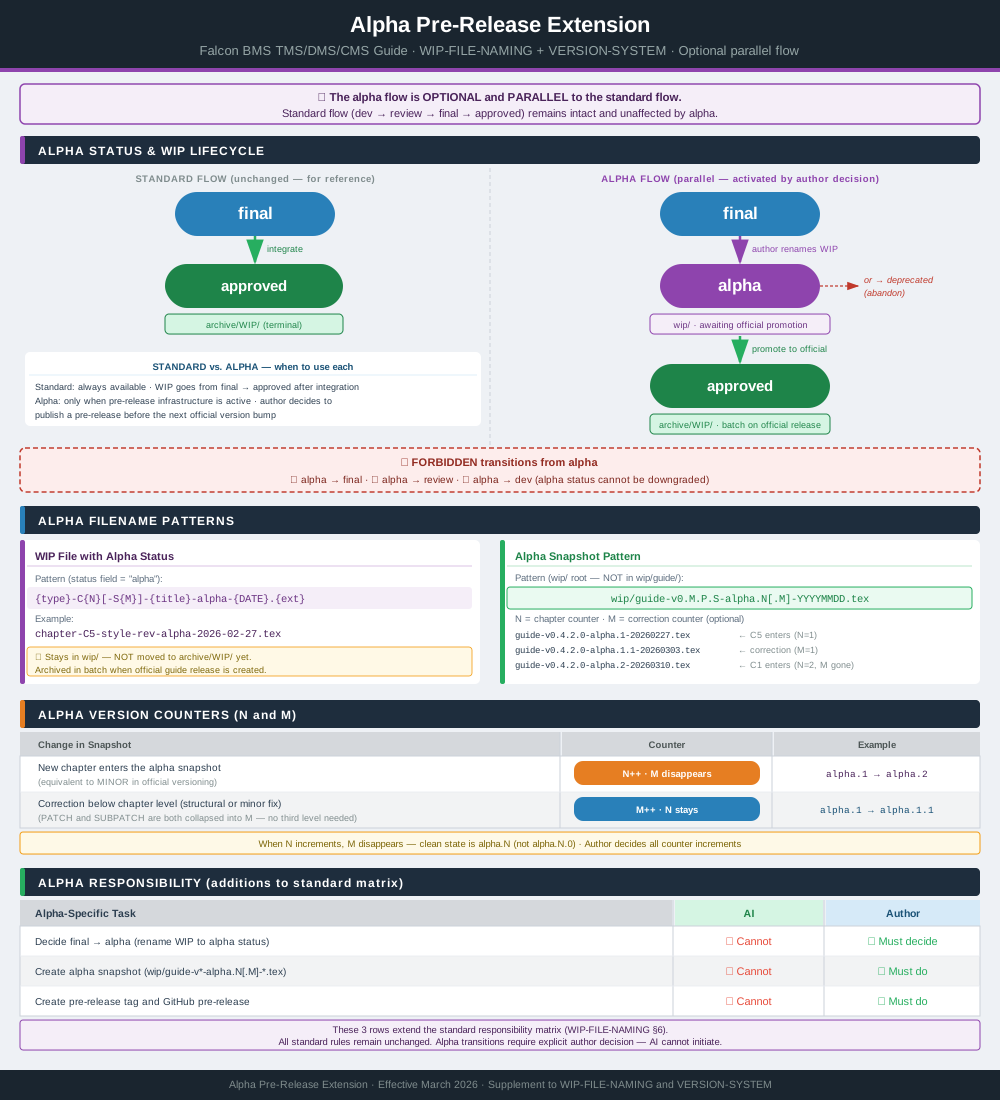
Alpha Snapshot Workflow (parallel, optional — when pre-release infrastructure active):
- Create alpha snapshot:
wip/guide-vMAJOR.MINOR.PATCH.SUBPATCH-alpha.N[.M]-YYYYMMDD.tex - Test compilation (multiple passes for indices)
- Validate PDF output
- Sign alpha PDF digitally (see §10.4)
- Create Git tag (
vMAJOR.MINOR.PATCH.SUBPATCH-alpha.N[.M]) - Create GitHub Pre-Release with signed PDF (mark explicitly as pre-release)
Note: guide.tex is NOT updated. Alpha snapshot stays in wip/ root until
promoted to official (see VERSION-SYSTEM §6.2 Phase 2).
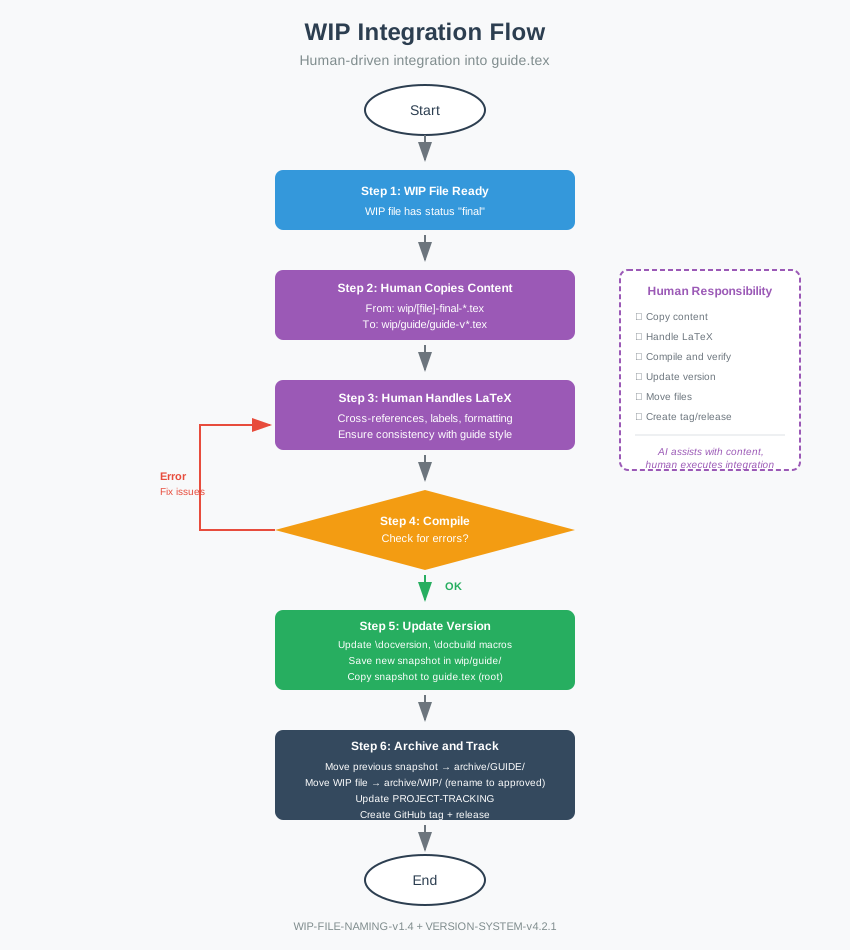
→ Visual references: WIP Integration Flow · Alpha Supplement
10.3 Version Tags
- Pre-publication:
v0.x.x.x(semantic versioning in 0.x regime) - First public release:
v1.0.0.0 - Subsequent releases: Standard semantic versioning
10.4 Digital Signature Workflow
All published PDFs are digitally signed via gov.br (ICP-Brasil, nível Prata/Ouro) before GitHub release. The signature is invisible (no visual stamp on the document).
PDFs to sign per release type:
| Release type | PDFs to sign |
|---|---|
| Official release | guide.pdf (root) |
| Alpha pre-release | wip/guide-vX.X.X.X-alpha.N[.M]-YYYYMMDD.pdf |
Procedure:
- Compile PDF locally
- Sign via gov.br portal (upload → sign → download)
- Save signed file as
..._assinado.pdfor replace original (keep naming consistent) - Commit signed PDF(s) before creating GitHub Release/Pre-Release
Notes:
docs/guide-web.pdfis synced automatically fromguide.pdfby thesync-pdf-to-docsworkflow — signguide.pdffirst, then let the workflow sync- Signature format:
adbe.pkcs7.detached(standard PDF signature) - Verification: gov.br portal (verificador.iti.gov.br) or any PDF reader with signature support
10.5 Web Publication Workflow
The guide is published in web format via Read the Docs (MkDocs) and GitBook, running in parallel with the existing LaTeX/PDF pipeline. MkDocs build validation is handled by the Travis CI pipeline (see §10.6).
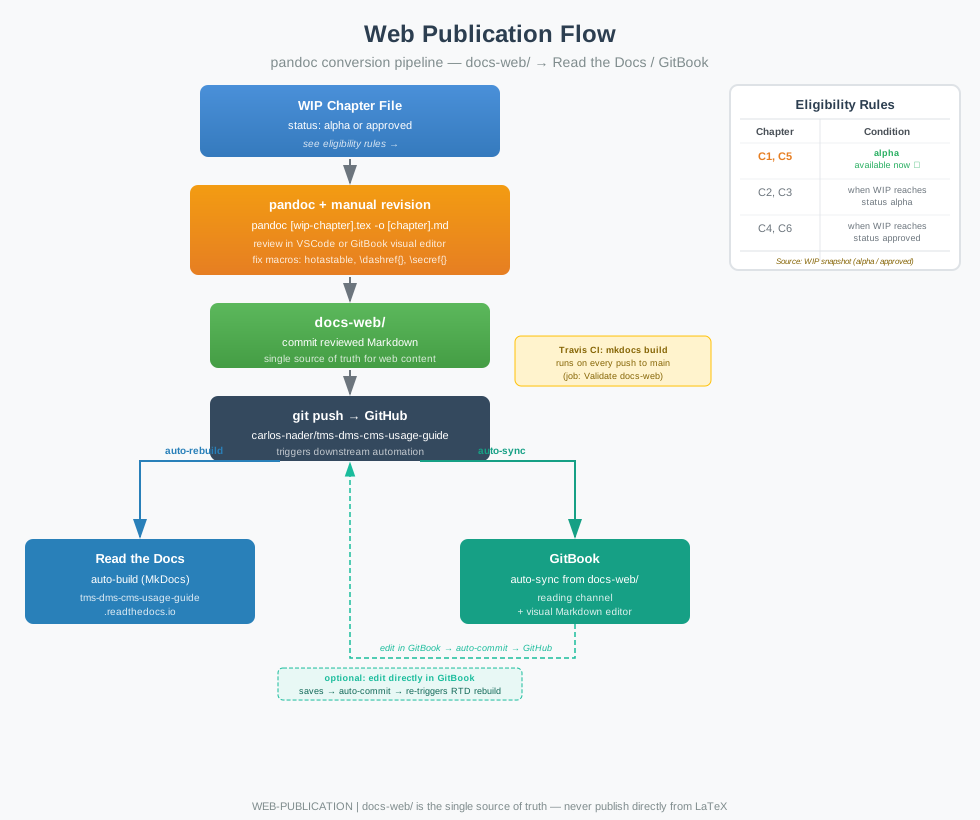
docs-web/ is the single source of truth for web content. Content is never published directly from LaTeX — each chapter is converted to Markdown via pandoc, manually reviewed, and committed to docs-web/. A push to GitHub triggers an automatic rebuild on Read the Docs and a sync on GitBook.
File naming convention: c{N}-{chapter-title}.md (e.g., c1-introduction.md, c5-cms.md).
Eligibility rule:
| WIP Chapter Status | Eligible for web conversion |
|---|---|
alpha or approved |
Yes |
final or below |
No |
Conversion process (per chapter):
- Run pandoc on the source WIP file (VSCode terminal)
- Review output — in VSCode or GitBook visual editor
- Manually fix custom macros (
hotastable,\dashref{}, etc.) - Commit reviewed Markdown to
docs-web/ - Push triggers: Read the Docs rebuild and GitBook sync
After each new alpha pre-release, update docs-web/README.md to reflect the current state:
- Update the section heading and snapshot version (e.g.,
alpha.2→alpha.3) - Update the snapshot link (filename includes date:
guide-vX.X.X.X-alphaY-YYYYMMDD.pdf) - Add any newly converted chapters to the list
- Update the closing paragraph to reflect which chapters are available and which are still pending
Limitation: Custom LaTeX macros (hotastable, \dashref{}, \secref{}, etc.) are not converted by pandoc and require manual adjustment.
→ Visual reference: Web Publication Flow
10.6 CI Pipeline (Travis CI)
Travis CI runs on every push to main. Configuration: .travis.yml. Validation script: ci/travis.sh.
| Job | Purpose | Fails when |
|---|---|---|
| GitGuardian Scan | Secret detection scan | Credentials or secrets detected in the commit |
| Build and Validate | Compile guide.pdf (2 passes); run preamble validation script; alpha audit (version/advertising consistency) |
LaTeX compilation error; preamble violation; alpha version mismatch |
| Integrity Check | Verify guide.tex is byte-identical to the active snapshot in wip/guide/; verify guide.pdf matches docs/guide-web.pdf |
Any byte mismatch between canonical files |
| Build Alpha | Compile the active alpha snapshot (if present) | LaTeX compilation error in alpha snapshot |
| Validate docs-web | Run mkdocs build to verify the web site config and content compile |
Invalid mkdocs.yml; Markdown error that prevents site generation |
Note: The Validate docs-web job does not use --strict mode. The mkdocs.yml nav declares chapter files that are populated incrementally — warnings for missing files are expected and non-fatal during the pre-publication phase.
10.7 Traceability: WIP, Issues, Commits
This project uses GitHub Issues as the primary unit for tracking WIP progress and integration.
10.7.1 WIP ↔ Issue linkage (practical rule)
- Any WIP file expected to progress beyond
dev(i.e., renamed toreview,final,alpha, orapproved) MUST have a corresponding GitHub Issue. - The Issue SHOULD be created before the first
dev → reviewrename. - Exceptions are limited to short-lived scratch files that will be discarded and never enter review.
10.7.2 Commit ↔ Issue references (non-negotiable)
- Any human-made commit that addresses work tracked by one or more GitHub Issues MUST include one
Refs #NNline per related issue in the commit message footer. - The
Refs #NNlines MUST be the last non-empty lines of the commit message.
Examples:
Integrate Section C4:S3 into snapshot

Refs #123
Rename WIP file to match naming convention

Refs #123
Refs #128
Notes:
- A “push” is transport only. The requirement is that commits being pushed include the footer when they relate to issues.
- Automated workflow/bot commits are exempt unless explicitly made issue-aware.
- Pull requests SHOULD reference issues using
Refs #NN. UseCloses #NNonly when the PR is intended to close the issue automatically.
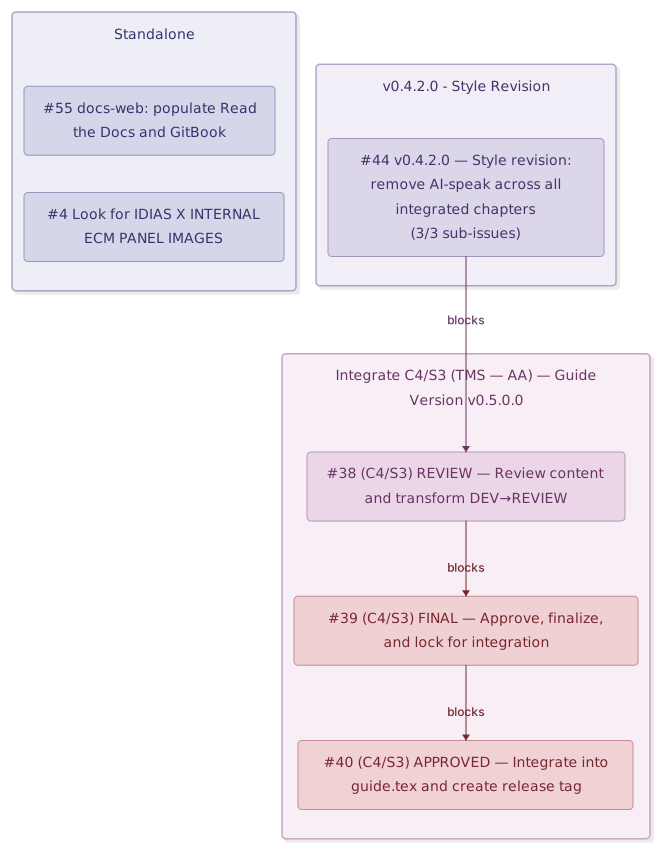
→ Visual reference: Issue Dependency Map
10.8 CHANGELOG Workflow
CHANGELOG.md is updated at every version bump — official releases and alpha
pre-releases — as part of Step 5 of the integration workflow (see §10.2 and
WIP Integration Flow).
Who drafts: Claude Code, based on:
docs/project-tracking.md(notes and development log)- WIP file metadata blocks (status, scope, date)
- GitHub issue comments (progress tracking)
Who approves: Author. No entry is inserted without explicit approval.
Format: Follows Keep a Changelog.
Sections used: Added, Changed, Fixed, Removed.
Pre-releases are marked *(pre-release)* on the version header line.
Insertion point: Always above the previous top entry, below the file header.
Process:
- Author signals version bump
- Claude Code reads tracking sources and drafts the entry
- Author reviews and approves the text
- Claude Code inserts the entry directly into
CHANGELOG.md - Entry is committed as part of the release commit
11. File Organization
11.1 Directory Structure
tms-dms-cms-usage-guide/
│
├── guide.tex                         # Current production version (.tex)
├── guide.pdf                         # Compiled PDF
├── INTEGRATED-FILES.md               # Auto-generated tracking report
├── CHANGELOG.md                      # Releases changelog tracking
├── SETUP.md                          # Infrastructure setup
├── mkdocs.yml                        # MkDocs configuration (web publication)
├── .readthedocs.yaml                 # Read the Docs build configuration
├── .gitbook.yaml                     # GitBook configuration
│
├── docs-web/                         # Markdown source for web publication (Read the Docs / GitBook)
│   ├── index.md                      # Landing page
│   └── c*-[chapter-title].md         # One file per chapter
│
├── docs/                             # Governance & tracking
│   ├── briefing.md
│   ├── wip-naming.md
│   ├── version-system.md
│   ├── project-tracking.md
│   ├── tex-preamble-consolidated.md
│   ├── guide-web.pdf                 # guide.pdf copy for GitHub Pages
│   ├── index.html                    # GitHub Pages landing page
│   ├── contributing.html             # Contributing page (GitHub Pages)
│   ├── WIP-Snapshot-Generator-v3.1.html
│   └── *.svg                         # Diagrams (repo overview, issue map, web publication flow)
│
├── wip/                              # Active work-in-progress files
│   ├── chapter-*.tex                 # Chapter drafts
│   ├── section-*.tex                 # Section drafts
│   └── guide/                        # Active guide snapshots
│
├── archive/                          # Historical & approved files
│   ├── WIP/                          # Integrated/deprecated WIP files
│   ├── GUIDE/                        # Older guide versions
│   └── GUIDE-STRUCTURE/              # Older structure-only files
│
├── template/                         # Templates & blueprints
│   └── template-wip.tex              # Canonical WIP template
│
├── fig/                              # Images used in the guide
├── misc/                             # Miscellaneous resources
│   └── STYLE-GUIDE.md
├── scripts/                          # Automation scripts
├── .github/                          # Issues, Actions, PR templates, community files
├── .vscode/                          # VSCode workspace settings
├── .devcontainer/                    # GitHub Codespaces configuration
│
├── LICENSE                           # CC BY-NC 4.0
└── README.md                         # This file
→ Visual reference: Repository Overview
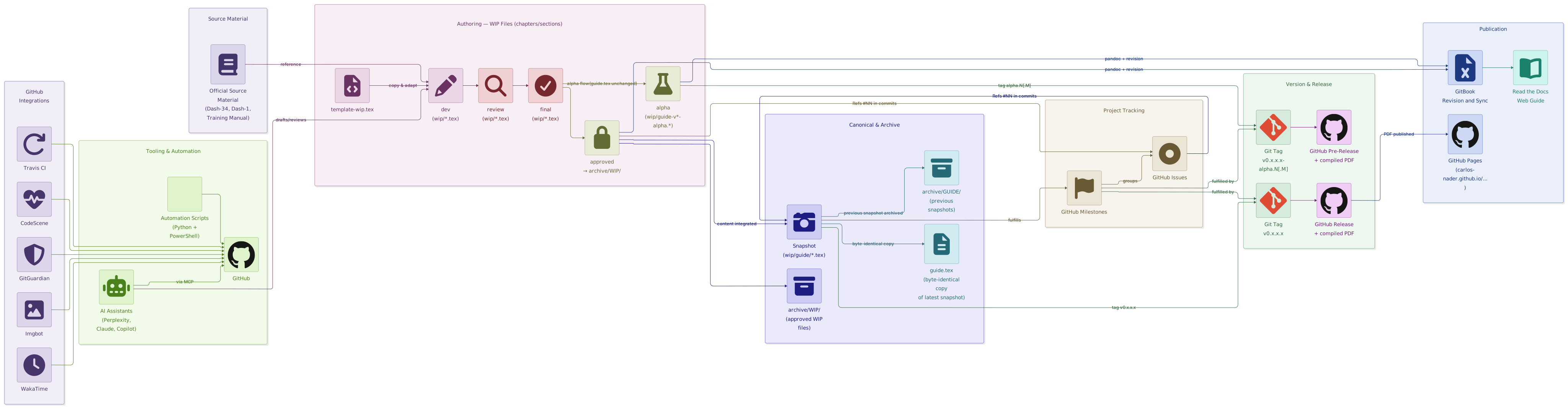
11.2 Archive Policy
- Approved WIP files →
archive/WIP/ - Old guide snapshots →
archive/GUIDE/ - Only latest snapshot remains in
wip/guide/ - Alpha pre-release snapshots (
wip/guide-v*-alpha.*.tex) remain inwip/root until the corresponding official release is created — they are NOT moved toarchive/GUIDE/until then
12. WIP File Template and LaTeX Preamble Architecture
12.1 Purpose and Location
All work-in-progress files MUST be created by copying and adapting:
template/template-wip.tex
This ensures:
- Standardized, validated preamble identical to main guide
- Consistent metadata blocks
- Content structures aligned with brief expectations
- Automated or semi-automated integration into guide.tex
Status: Template updated (25 March 2026) with enhanced preamble architecture (hotastable v2.1, List of HOTAS Tables, cross-reference macros, extended PDF metadata + hyperxmp, VERSION CONTROL MACROS repositioned before COLORS AND LINKS, enumitem).
12.2 What the Template Provides
- Standard preamble (packages, geometry, macros) identical to
guide.tex - Metadata block (non-rendered comments for tracking)
- Section/subsection skeleton with proper hierarchy
- Configured hotastable environment v2.1 with 7-column HOTAS layout
12.3 Preamble Architecture (Updated V2.1)
The preamble in template/template-wip.tex and guide.tex is now organized into the following sections:
12.3.1 Document Class
\documentclass[11pt, a4paper, twoside]{report}
reportclass: Professional multi-chapter documents with chapter-level hierarchytwosideoption: Optimized for double-sided printing (alternating header/footer layout)- Font size: 11pt base (readable on screen and print)
12.3.2 Basic Encoding and Language
\usepackage[utf8]{inputenc}
\usepackage[T1]{fontenc}
\usepackage[english]{babel}
- UTF-8 encoding: Full Unicode support for international characters
- T1 font encoding: Proper hyphenation and accented characters
- English language: Hyphenation rules and babel localization
12.3.3 Fonts and Microtypography
\usepackage{lmodern}
\usepackage{microtype}
- Latin Modern fonts: High-quality, scalable fonts for screen and print
- Microtype: Subtle typographic refinements (character protrusion, font expansion)
12.3.4 Page Geometry and Layout
\usepackage{geometry}
\geometry{a4paper, left=2.0cm, right=2.0cm, top=2.5cm, bottom=2.5cm}
\usepackage{setspace}
\onehalfspacing
- A4 paper: International standard (210 × 297 mm)
- Margins: Symmetric 2.0 cm left/right, 2.5 cm top/bottom
- Text width: 17.0 cm (calculated)
- Line spacing: 1.5× for readability
12.3.5 Colors and Links
\usepackage[table]{xcolor}
\definecolor{linkblue}{HTML}{004488}
\definecolor{linkred}{HTML}{882222}
\definecolor{headerblue}{HTML}{003366}
\definecolor{rowgray}{HTML}{F5F5F5}
\definecolor{subheadgray}{HTML}{E0E0E0}

\usepackage{soul}
\usepackage[pdfencoding=auto, psdextra, colorlinks=true, linkcolor=linkblue,
            citecolor=linkred, urlcolor=linkblue, breaklinks=true]{hyperref}
\usepackage{hyperxmp}
\usepackage{bookmark}
- xcolor[table]: Color support with table row coloring
- Custom colors: Professional palette (linkblue, linkred, headerblue, rowgray, subheadgray)
- soul: Text highlighting and underlining
- hyperref: Clickable PDF links with custom colors, line-breaking support
- hyperxmp: XMP metadata extension for hyperref — enables
pdfcopyright,pdflicenseurl,pdfcontacturlfields - bookmark: Enhanced PDF bookmarks
12.3.6 PDF Metadata
\hypersetup{
    pdftitle={TMS, DMS and CMS Usage Guide for Falcon BMS},
    pdfauthor={Carlos "Metal" Nader},
    pdfsubject={Flight Simulation - Falcon BMS HOTAS Reference},
    pdfkeywords={Falcon BMS, F-16, HOTAS, TMS, DMS, CMS, Flight Simulation},
    pdfcreator={pdfLaTeX (TeXstudio)},
    pdfproducer={TeXstudio},
    pdflang={en-US},
    pdfcopyright={CC BY-NC 4.0 · Carlos "Metal" Nader},
    pdflicenseurl={https://creativecommons.org/licenses/by-nc/4.0/},
    pdfcontacturl={https://github.com/carlos-nader/tms-dms-cms-usage-guide},
    pdfdisplaydoctitle=true,
    bookmarksnumbered=true,
    bookmarksopen=true,
    bookmarksdepth=1,
    pdfstartview=FitH,
}
\pdfinfo{/CreationDate (D:\docbuild) /ModDate (D:\docbuild)}
Purpose: Embeds metadata in generated PDF for proper indexing, citation, and document properties. Fields pdfcopyright, pdflicenseurl, and pdfcontacturl require \usepackage{hyperxmp} (loaded in §12.3.5).
Fields:
- pdftitle: Full document title
- pdfauthor: Primary author name
- pdfsubject: Document category/topic
- pdfkeywords: Searchable keywords (comma-separated)
- pdfcreator/pdfproducer: LaTeX engine information
- pdflang: Document language (ISO 639-1 + ISO 3166-1)
- pdfcopyright: License statement embedded as XMP metadata (requires hyperxmp)
- pdflicenseurl: URL of the applicable license (requires hyperxmp)
- pdfcontacturl: Repository URL for contact/attribution (requires hyperxmp)
- pdfdisplaydoctitle: Show
pdftitlein PDF viewer title bar instead of filename - bookmarksnumbered: Include section numbers in PDF bookmark panel
- bookmarksopen: Expand bookmark panel on document open
- bookmarksdepth: Bookmark panel depth on open (1 = chapter level only)
- pdfstartview: Initial zoom mode (
FitH= fit page width) \pdfinfo: Sets PDF/CreationDateand/ModDatefrom\docbuildmacro (pdfTeX primitive — not a hyperref key)
12.3.7 Captions
\usepackage{caption}

% GLOBAL PATTERN
\captionsetup{font=small, labelfont=bf, justification=centering, singlelinecheck=true}

% FIGURES
\captionsetup[figure]{font=footnotesize, labelfont=bf, justification=centering, singlelinecheck=true}

% TABLES/LONGTABLE/hotastable
\captionsetup[table]{font=small, labelfont=bf, justification=centering, singlelinecheck=true}
- caption: Professional figure/table captions
- Global: Small font, bold labels, centered
- Figures: Footnotesize (slightly smaller than tables)
- Tables: Small font (consistent with body text)
12.3.8 Headers and Footers (Improved for Two-Sided Layout)
\usepackage{fancyhdr}
\setlength{\headheight}{25pt} % Increased from 15pt for long chapter names
\pagestyle{fancy}
\fancyhf{} % Clear all
\fancyhead[LO,RE]{\small\textit{\leftmark}} % Outer edge: chapter name
\fancyhead[RO,LE]{\small\thepage}           % Inner edge: page number
\fancyfoot{}                                % No footer
\renewcommand{\headrulewidth}{0.4pt}
\renewcommand{\footrulewidth}{0pt}
- fancyhdr: Custom header/footer control
- headheight: Increased to 25pt (accommodates long chapter names without warnings)
- Two-sided layout:
- Odd pages (right): Chapter name (left), page number (right)
- Even pages (left): Page number (left), chapter name (right)
- Headers: 0.4pt rule under chapter name
- Footers: Empty (page numbers in header)
12.3.9 Title Hierarchy (titlesec Full Configuration)
Comprehensive 5-level hierarchy with optical adjustments:
Chapter:
\titleformat{\chapter}[display]
  {\normalfont\huge\bfseries}
  {\chaptertitlename\ \thechapter}
  {20pt}
  {\Huge}
\titlespacing*{\chapter}{0pt}{50pt}{40pt}
Section, Subsection, Subsubsection:
- Professional spacing and size hierarchy
- Consistent numbering
- Clear visual distinction
Paragraph (Level 4):
\titleformat{\paragraph}[runin]
  {\normalfont\small\bfseries} % SMALL + bold (optical compensation)
  {}
  {0em}
  {}
\titlespacing{\paragraph}{0pt}{8pt}{1em}[0pt]
Subparagraph (Level 5):
- Prepared for future use
- Less prominent than paragraph
- Inline formatting
12.3.10 Tables and Macros
\usepackage{booktabs}
\usepackage{array}
\usepackage{longtable}
\usepackage{tabularx}

% Custom Columns
\newcolumntype{L}[1]{>{\raggedright\arraybackslash}p{#1}}
\newcolumntype{C}[1]{>{\centering\arraybackslash}p{#1}}
\newcolumntype{R}[1]{>{\raggedleft\arraybackslash}p{#1}}

% Macro for Visual Reference Links
\newcommand{\imglink}[1]{\hspace{2pt}\hyperref[#1]{\scriptsize\textbf{[Fig]}}}
- booktabs: Professional table rules (toprule, midrule, bottomrule)
- array: Enhanced column definitions
- longtable: Multi-page tables with repeating headers
- tabularx: Auto-width columns
- Custom columns:
L{width}(left),C{width}(center),R{width}(right) - imglink macro: Inline figure references in tables
12.3.11 List of HOTAS Tables (NEW in v2.1)
\makeatletter
\newcommand{\listofhotastables}{%
    \section*{List of HOTAS Tables}%
    \addcontentsline{toc}{section}{List of HOTAS Tables}%
    \@starttoc{hotas}%
}
\makeatother
Purpose: Generates an automated index of all HOTAS tables in the guide, similar to List of Figures or List of Tables.
Usage in front matter:
\newpage
\tableofcontents
\newpage

% --------------------------------------------------------------------------
% LIST OF HOTAS TABLES
% --------------------------------------------------------------------------
\phantomsection    % CRITICAL: Creates anchor for PDF bookmark
\listofhotastables
\newpage

\pagenumbering{arabic}
CRITICAL: Always use \phantomsection immediately before \listofhotastables to ensure PDF bookmarks point to the correct page. Without it, the bookmark will incorrectly point to the Table of Contents page instead of the List of HOTAS Tables page.
Automatic registration: Each hotastable environment automatically registers itself in the .hotas auxiliary file via:
\addtocontents{hotas}{\protect\contentsline{table}{\protect\numberline{\thetable}#1}{\thepage}{table.\thetable}}
Compilation requirement: Run pdflatex twice to generate and populate the List of HOTAS Tables:
- First pass: Creates
.hotasfile with table entries - Second pass: Reads
.hotasfile and typesets the index
12.3.12 HOTAS Table Environment (hotastable v2.1)
Updated: 2026-02-11 (Guide v0.4.1.0)
% --------------------------------------------------------------------------
% HOTAS table environment
% Version: 2.1 (2026-02-10)
% --------------------------------------------------------------------------

\newenvironment{hotastable}[1]{%
	\footnotesize
	\setlength{\tabcolsep}{3pt}
	\renewcommand{\arraystretch}{1.35}
	\begin{longtable}{L{1.00cm} L{0.90cm} L{0.90cm} L{3.30cm} L{6.40cm} L{1.40cm} L{1.60cm}}
		\caption{#1}\label{table.\thetable}\\
		\noalign{\addtocontents{hotas}{\protect\contentsline{table}{\protect\numberline{\thetable}#1}{\thepage}{table.\thetable}}}%
		\rowcolor{headerblue}
		\multicolumn{1}{>{\centering\arraybackslash}p{1.00cm}}{\textbf{\color{white}Mode}} &
		\multicolumn{1}{>{\centering\arraybackslash}p{0.90cm}}{\textbf{\color{white}Dir.}} &
		\multicolumn{1}{>{\centering\arraybackslash}p{0.90cm}}{\textbf{\color{white}Act.}} &
		\multicolumn{1}{>{\centering\arraybackslash}p{3.30cm}}{\textbf{\color{white}Function}} &
		\multicolumn{1}{>{\centering\arraybackslash}p{6.40cm}}{\textbf{\color{white}Effect / Nuance}} &
		\multicolumn{1}{>{\centering\arraybackslash}p{1.40cm}}{\textbf{\color{white}Dash34}} &
		\multicolumn{1}{>{\centering\arraybackslash}p{1.60cm}}{\textbf{\color{white}Train.}} \\
		\endfirsthead
		\rowcolor{headerblue}
		\multicolumn{1}{>{\centering\arraybackslash}p{1.00cm}}{\textbf{\color{white}Mode}} &
		\multicolumn{1}{>{\centering\arraybackslash}p{0.90cm}}{\textbf{\color{white}Dir.}} &
		\multicolumn{1}{>{\centering\arraybackslash}p{0.90cm}}{\textbf{\color{white}Act.}} &
		\multicolumn{1}{>{\centering\arraybackslash}p{3.30cm}}{\textbf{\color{white}Function}} &
		\multicolumn{1}{>{\centering\arraybackslash}p{6.40cm}}{\textbf{\color{white}Effect / Nuance}} &
		\multicolumn{1}{>{\centering\arraybackslash}p{1.40cm}}{\textbf{\color{white}Dash34}} &
		\multicolumn{1}{>{\centering\arraybackslash}p{1.60cm}}{\textbf{\color{white}Train.}} \\
		\endhead
		\multicolumn{7}{r}{\small\emph{Continued on next page}}\\
		\endfoot
		\endlastfoot
	}{%
	\end{longtable}
}
Changes from v1.0 to v2.1:
- Font size:
\small→\footnotesize(10pt → 8pt) \tabcolsep: 2pt → 3pt\arraystretch: 1.25 → 1.35- Train. column: 2.10cm → 1.60cm
- Total width: 15.6cm → 15.50cm
- NEW: Automatic registration in
.hotasindex file
Key features:
- Column widths: Optimized for 15.50 cm total width (Mode 1.00, Dir. 0.90, Act. 0.90, Function 3.30, Effect/Nuance 6.40, Dash34 1.40, Train. 1.60)
- Header repeat: Blue header row repeats on every page (
\endfirsthead,\endhead) - Footer: “Continued on next page” on all but last page
- Compact spacing:
\tabcolsep{3pt},\arraystretch{1.35} - Automatic indexing: Self-registers in List of HOTAS Tables
12.3.13 Simple Reference Macros for BMS Docs
\newcommand{\dashref}[1]{Dash-34~\S~#1}
\newcommand{\dashone}[1]{Dash-1~\S~#1}
\newcommand{\trnref}[1]{TRN~#1}
\newcommand{\trnman}{BMS Training Manual 4.38.1}
\newcommand{\bmsver}{Falcon BMS~4.38.1}
\newcommand{\dashrefs}[1]{\textit{TO 1F-16CMAM-34-1-1}, Dash-34, sections \texttt{#1}}
Usage:
- dashref: Dash-34 section references in narrative text —
\dashref{2.1.5}→ “Dash-34 § 2.1.5” - dashone: Dash-1 section references —
\dashone{3.4.2}→ “Dash-1 § 3.4.2” - trnref: Training mission references in narrative text —
\trnref{18}→ “TRN 18” - trnman: Full training manual title — “BMS Training Manual 4.38.1”
- bmsver: BMS version string — “Falcon BMS 4.38.1”
- dashrefs: Extended Dash-34 citation
Note: In hotastable cells, use plain text (e.g., “3-48”) instead of macros to avoid formatting issues.
Deprecation notice: The previous practice of using \trnref{18 (BARCAP)} with full mission names in table cells is deprecated as of v0.4.1.0. Use mission numbers only in tables; full descriptions are in the BMS Training Manual.
12.3.14 Cross-Reference Macros (NEW in v2.1)
\newcommand{\secref}[1]{\hyperref[#1]{Section~\ref*{#1}}}
\newcommand{\chapref}[1]{\hyperref[#1]{Chapter~\ref*{#1}}}
\newcommand{\tabref}[1]{\hyperref[#1]{Table~\ref*{#1}}}
\newcommand{\figref}[1]{\hyperref[#1]{Figure~\ref*{#1}}}
Purpose: Standardized, fully-clickable cross-references to internal guide elements.
Usage in narrative text:
% OLD (inconsistent, partial clickability):
See Section \ref{sec:C2-S1} for details.
As shown in Table \ref{tab:dms-soi}.

% NEW (consistent, fully clickable):
See \secref{sec:C2-S1} for details.
As shown in \tabref{tab:dms-soi}.
Advantages:
- Full clickability: Entire phrase (“Section 2.1”) is clickable, not just the number
- Consistency: Standardized format across document
- Auto-updating: Reference numbers update automatically with document changes
- No double-linking: Uses
\ref*{...}(asterisk) to prevent nested hyperlinks
Available macros:
\secref{label}→ “Section X.Y” (clickable)\chapref{label}→ “Chapter N” (clickable)\tabref{label}→ “Table N.M” (clickable)\figref{label}→ “Figure N.M” (clickable)
12.3.15 Version Control Macros
Preamble position: Defined before the COLORS AND LINKS section (§12.3.5) so that \docbuild is available to \pdfinfo at load time.
\newcommand{\docversion}{0.4.1.0}
\newcommand{\docbuild}{20260211}
\newcommand{\docstartdate}{05 January 2026}
\newcommand{\docenddate}{11 February 2026}
\newcommand{\chapterscompletedof}{4/6}
\newcommand{\tablesfilledpct}{Chapter 3 (DMS) and Chapter 5 (CMS)}
\newcommand{\fulldocversion}{\docversion+\docbuild}
- docversion: Semantic version (MAJOR.MINOR.PATCH.SUBPATCH)
- docbuild: Build date (YYYYMMDD) — also used by
\pdfinfoto set PDF CreationDate/ModDate - fulldocversion: Combined version string (displayed on title page)
- chapterscompletedof: X/6 (total planned chapters: 6)
- Progress tracking: Chapters completed, tables filled status
Update rule: These macros MUST be updated in sync when creating new snapshots.
12.3.16 Graphics
\usepackage{graphicx}
\graphicspath{{fig/}}
\usepackage{float}
- graphicx: Image inclusion (
\includegraphics) - graphicspath: Default directory for figures
- float: Enhanced float positioning control (
[H]for “exactly here”)
12.3.17 List Customization (NEW in v2.1)
\usepackage{enumitem}
Purpose: Provides enhanced control over itemize, enumerate, and description lists.
Example usage:
% Compact list (no vertical spacing between items)
\begin{itemize}[nosep]
    \item First item
    \item Second item
\end{itemize}

% Custom spacing
\begin{enumerate}[itemsep=2pt]
    \item Step one
    \item Step two
\end{enumerate}
Features:
nosep— Removes all spacing (compact lists)noitemsep— Removes spacing between items onlyitemsep=<length>— Custom spacing between itemstopsep=<length>— Spacing before/after list
12.3.18 Title and TOC Configuration
\title{TMS, DMS and CMS Usage Guide for \bmsver}
\author{Carlos ``Metal'' Nader}
\date{Version \fulldocversion{} | Progress: Chapters \chapterscompletedof{} |
      Tables \tablesfilledpct{} | February 2026}

\begin{document}
\maketitle
\pagenumbering{roman}

% --------------------------------------------------------------------------
% TOC DEPTH CONFIGURATION
% --------------------------------------------------------------------------
\setcounter{tocdepth}{3}       % Show up to \subsubsection in TOC
\setcounter{secnumdepth}{3}    % Number up to \subsubsection

\newpage
\tableofcontents
\newpage

% --------------------------------------------------------------------------
% LIST OF HOTAS TABLES
% --------------------------------------------------------------------------
\phantomsection    % CRITICAL: Anchor for PDF bookmark
\listofhotastables
\newpage

\pagenumbering{arabic}
- Title page: Auto-generated with version and progress info
- Roman numerals: Front matter (title, TOC, List of HOTAS Tables)
- TOC depth: Include up to subsubsection level (1.2.3)
- Numbering: Up to subsubsection level
- List of HOTAS Tables: NEW navigational feature in v2.1
- Arabic numerals: Main content chapters
\phantomsection: Creates proper anchor for PDF bookmark navigation
12.4 Metadata Block Format
% ============================================================================
% METADATA BLOCK (non-rendered, for tracking)
% ============================================================================
% Target: Chapter C, Section S, Subsection S
% Issue: #NN
% Status: dev
% Date: YYYY-MM-DD
% Author: AI / Human Name
% Notes: TBD: Table population. Known issues: None.
% Cross-ref: Guide v0.4.1.0, related-section-*.tex
% ============================================================================
Mandatory fields:
- Target: Where in guide structure this WIP belongs
- Issue: Corresponding GitHub Issue number (e.g.,
#48) - Status: dev → review → final → approved → deprecated (Parallel alpha flow: final → alpha → approved — active only when pre-release infrastructure is in progress)
- Date: Creation or last-edit date (YYYY-MM-DD)
- Author: AI (Session #) or Human Name
Note: Guide snapshots (wip/guide/guide-v*.tex) and the canonical guide.tex do not carry a WIP metadata block. This is by design — they are versioned documents, not work-in-progress files. Their tracking information is embedded in the preamble macros (\docversion, \docbuild) and the filename itself.
13. How to Create and Integrate WIP Files
→ Visual reference: WIP File Creation Workflow

Step 1: Create from Template
cp template/template-wip.tex wip/section-C5-S2-cms-new-dev-2026-02-11.tex
Step 2: Update Metadata Block
- Set Target, Status (dev), Date, Author
- Add development notes
Step 3: Develop Content
- Replace skeleton sections with actual narrative, tables, etc.
- Use
hotastableenvironment for HOTAS tables - Use reference macros:
\dashref{},\trnref{},\secref{},\tabref{}, etc. - In table cells, use plain text for references (e.g., “3-48” instead of
\dashref{3-48}) - In Train. column, use mission numbers only (e.g., “18, 28”)
Step 4: Test Compilation
pdflatex section-C5-S2-cms-new-dev-2026-02-11.tex
For files with HOTAS tables: Compile twice to generate List of HOTAS Tables.
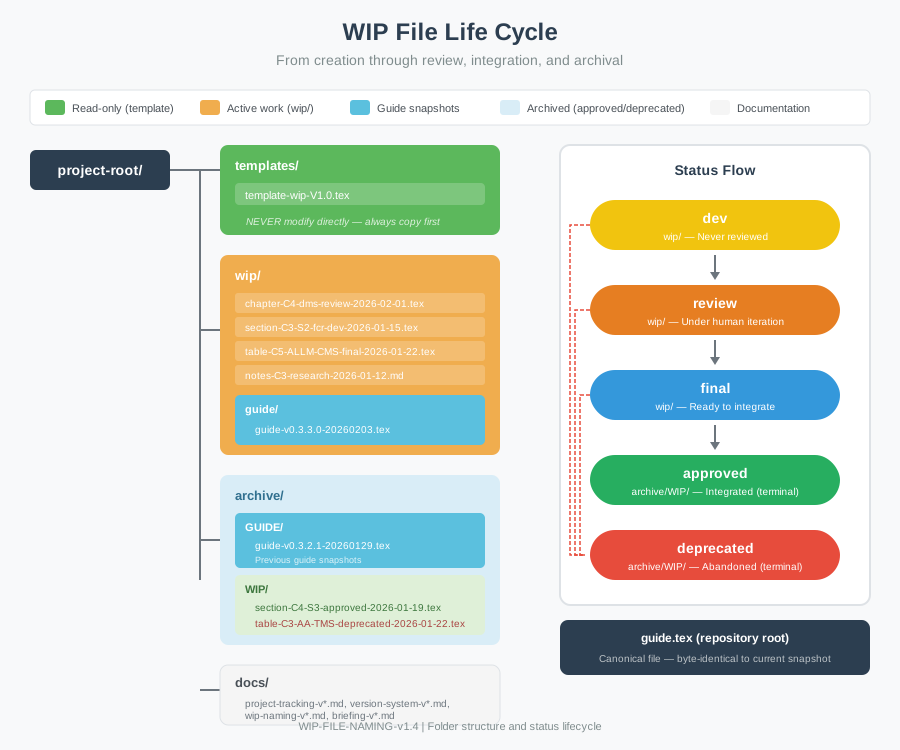
Step 5: Workflow
- dev: Author working
- review: Author review
- final: Ready for integration
- alpha: Integrated into pre-release alpha snapshot (parallel flow only);
WIP file remains in
wip/until official integration - approved: Integrated into guide, moved to ARCHIVE
→ Visual reference: WIP File Life Cycle
14. Quick Reference: File Naming Convention
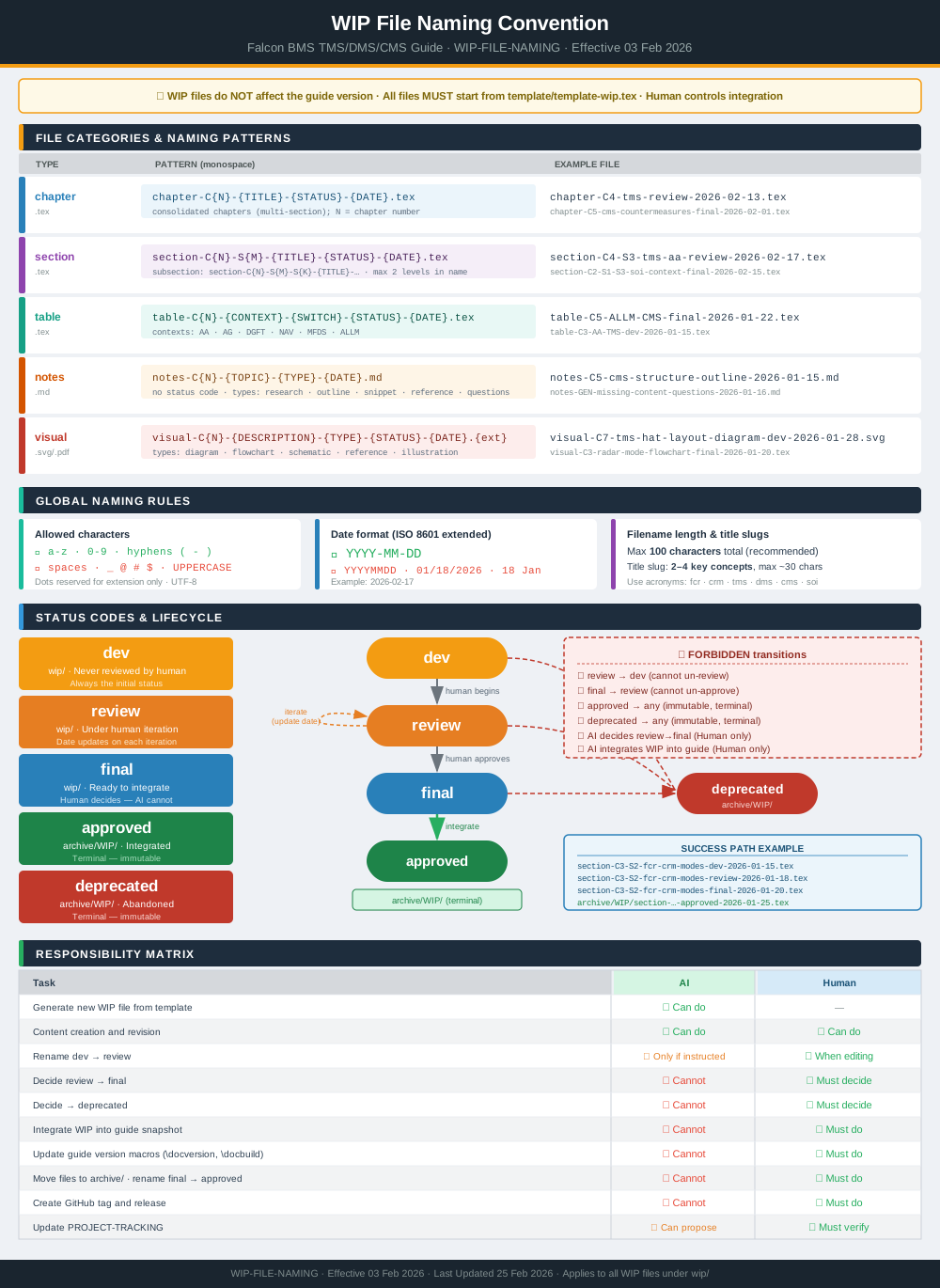
Pattern: prefix-C#-S#-title-STATUS-YYYYMMDD.ext
Examples:
section-C3-S3-dms-down-review-2026-02-11.textable-C5-S2-cms-table-final-2026-02-11.texchapter-C4-tms-structure-dev-2026-02-11.texnotes-C3-research-questions-2026-02-11.md
Status codes:
dev— Draftreview— Under reviewfinal— Ready for integrationalpha— Integrated into pre-release snapshot (parallel flow only)approved— Integrated and archiveddeprecated— Intentionally retired
→ Visual reference: WIP Naming Diagram
15. Checklist for Contributors
- Copy template from template/template-wip.tex
- Follow naming convention
- Complete metadata block
- Update Status as work progresses
- Test LaTeX compilation (run pdflatex twice for tables)
- Provide Dash-34 and training mission references
- Use mission numbers only in Train. column (e.g., “18, 28”)
- Use cross-reference macros (
\secref,\tabref, etc.) in narrative text - Request review when ready (Status: review)
- Incorporate feedback
- Mark final when complete (Status: final)
- (Alpha flow only, if pre-release infrastructure active) Mark alpha when integrated
into pre-release snapshot (Status: alpha) — WIP stays in
wip/pending official integration - Author integrates and archives
Note: This document is a work in progress and may be updated without notice.
Version: 2026-03-17
Status: Ready for use and contribution
License: CC BY-NC 4.0